Annke Nova - How to add Nova S to DVR?
Applies to: I41HG/I41CS
Purpose: Nova S can be added to DVR so that the recordings from Nova S will go to the hard drive installed inside DVR. Here is an example of how to add Nova S to DT81GB.
1. Connect Nova S to the router wirelessly via an app named Annke nova.
You can refer to the link below to connect Nova S to the phone.
https://help.annke.com/hc/en-us/articles/360000253501
2. Connect DVR to the router with an ethernet cable. (PS: Nova S and DVR should be connected to the same router.)
3. Please log in to your DVR on the monitor.
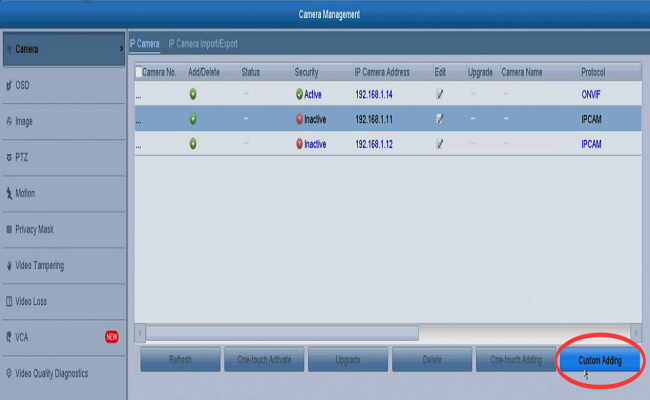
4. Please go to the Menu-->Camera Management-->Camera-->IP Camera, click custom adding at the right corner.
5. Choose the channel where the nova s is plugged into and then input the password of this camera. (PS: password is the verification code at the bottom of the camera, which is 6 capital letters, and should be input as capital.)
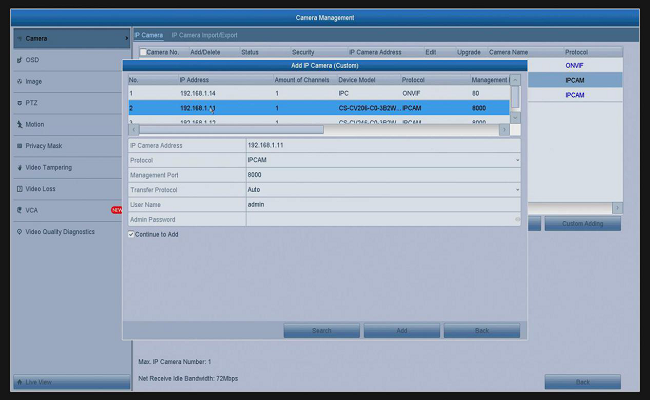
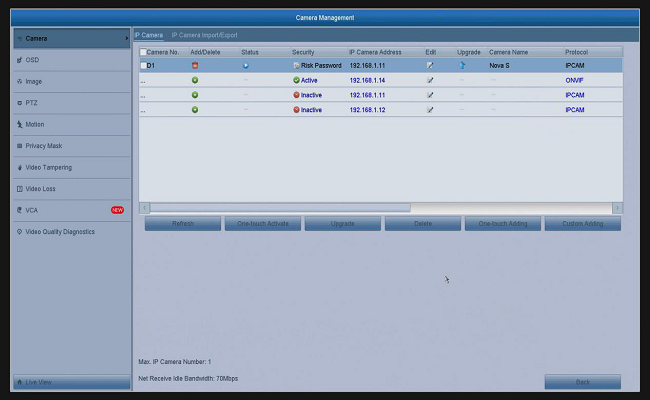
6. Click add, then you will see that this device has been added successfully, and you can see a play icon in blue which you can find under the camera‘s status.
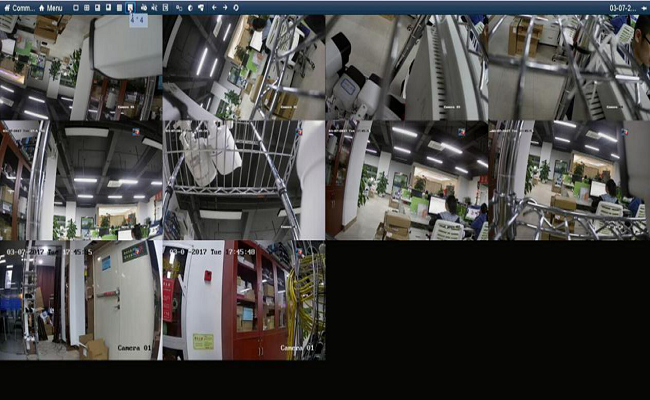
7. Please go back to the main screen. and then choose a 4*4 display pattern at the top toolbar, then, you will see all analog cameras and nova s (I41HG).
Was this article helpful?
Bu bilgiler sorununuzu çözmeye yardımcı oldu mu?
Still need help?
Uzman ekibimiz size yardımcı olmak için burada.