Annke Nova - How to Reset My Nova S Back to Factory Default Settings?
20 Aug 2026
378 views
Applies to: I41CS
Purpose: This instruction is to help you reset the camera back to the factory setting.
Note: After you reset the camera, it will restore itself to factory default settings, thus you will need to reset all the functions.
Steps:
1. Please plug the camera into the power supply.
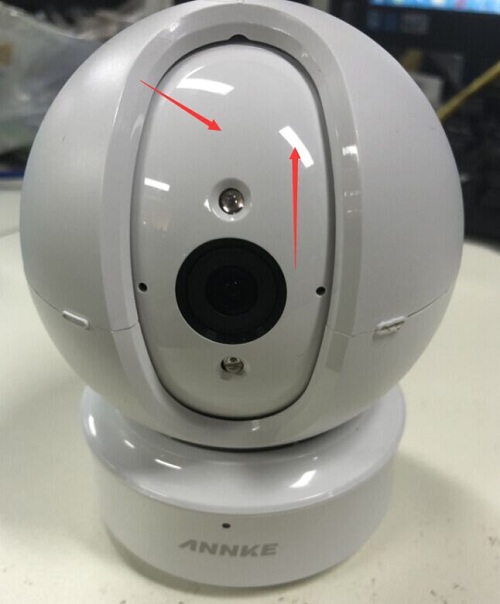
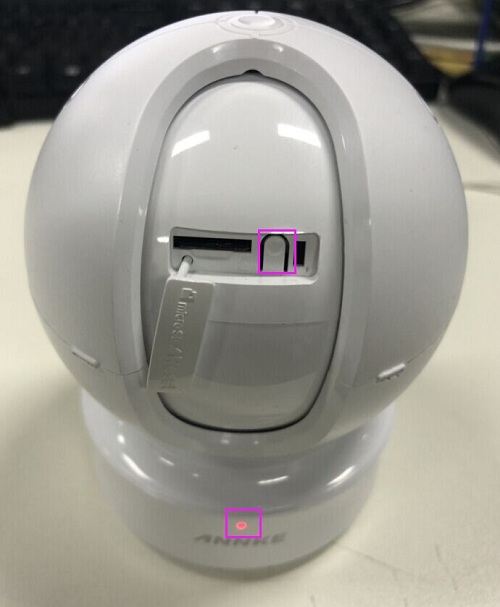
2. If you can't find the button when resetting the camera, or can't find the slot when inserting the SD card, please move the lens up by hand, then open the Micro SD/Reset parts.
3. Please long-press the reset button for more than 15 seconds, then the indicator light will stay in red, which means your resetting is completed.
Was this article helpful?
Bu bilgiler sorununuzu çözmeye yardımcı oldu mu?
Thanks for your feedback!
Still need help?
Uzman ekibimiz size yardımcı olmak için burada.