Annke Sight - How to Upgrade System's Firmware Version?
19 Aug 2026
383 views
Applies to: NW41V/N441H/N441K/N28WEB/N441B/N441D/N441L/N44PAN/N44PAJ/N34WDB/N34WDD/N44WEB/N44WED/N44WEC/NW41V/N44WBD/N48WHP/N48WHE
Here are the steps for you:
- Contact support@annke.com or Submit a request to our technical support new firmware file.
- Copy the new firmware file to a USB drive. (The USB drive should be FAT32 format)
- Insert USB hard drive to NVR's USB port.
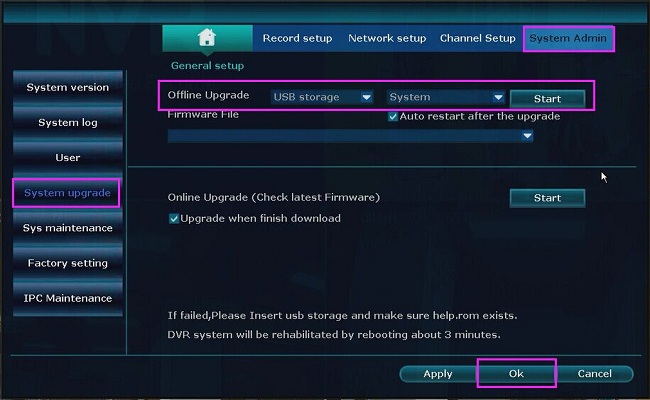
- Go to the NVR Setup--System Admin--System upgrade select the USB storage option in the Offline Upgrade box and then click Start to process.
Was this article helpful?
Bu bilgiler sorununuzu çözmeye yardımcı oldu mu?
Thanks for your feedback!
Still need help?
Uzman ekibimiz size yardımcı olmak için burada.