Annke Vision - How to Access the IP Camera on Computer View IP Locally?
19 Aug 2026
362 views
Applies to: I61DQ/I21AE/I21AF
1. Please log in with the IP of the system. You can refer to this link.
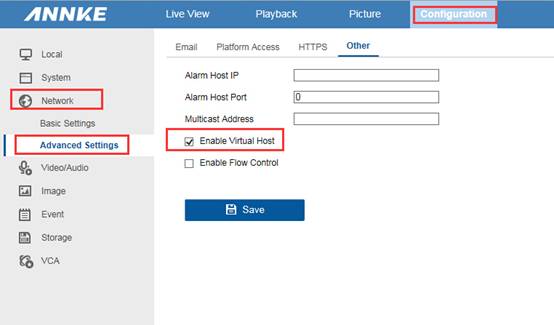
2. Please go to Configuration-Network-Advanced Settings-Others to click Enable virtual Host.
3. Please go to Configuration-System-Camera management to find the IP of the camera.
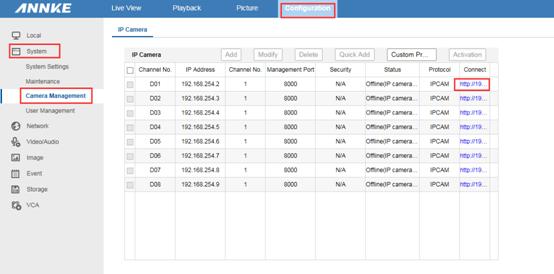
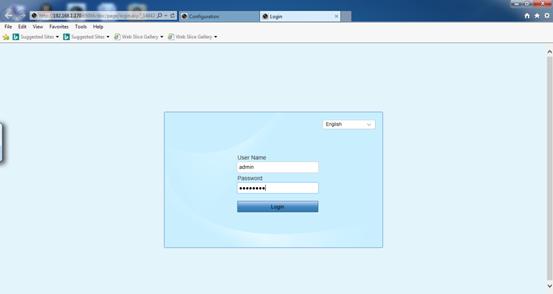
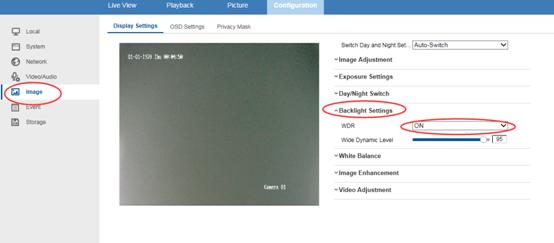
4. Click the link of the camera‘s IP and then go to Configuration-Image-Backlight settings to turn on WDR.
The user name is admin, the password is your NVR‘s password
Was this article helpful?
Bu bilgiler sorununuzu çözmeye yardımcı oldu mu?
Thanks for your feedback!
Still need help?
Uzman ekibimiz size yardımcı olmak için burada.