Annke Vision - How to Cancel Wizard on Monitor/TV?
20 Aug 2026
381 views
Applies to:
DT41Y/DT61Y/DT81Y/DN41R/DN61R/DN81R/DN31GN/DT41GB/DT81GB/DT61GB/DT41GB/DT81GB/DT41DB/DW41JD/DW81KD/DW61LD/DT81DP//N48PI/N44PI/N46PI/N44PAM/N48PAW/N46PCK/N88PCH/N48PBB/S500/S300/FC200/NCK800/H800/H500
Purpose:
The wizard helps for basic setups, if you don’t want it to show after restart anymore, there are two ways to disable it.
Steps:
There are two methods to cancel the wizard.
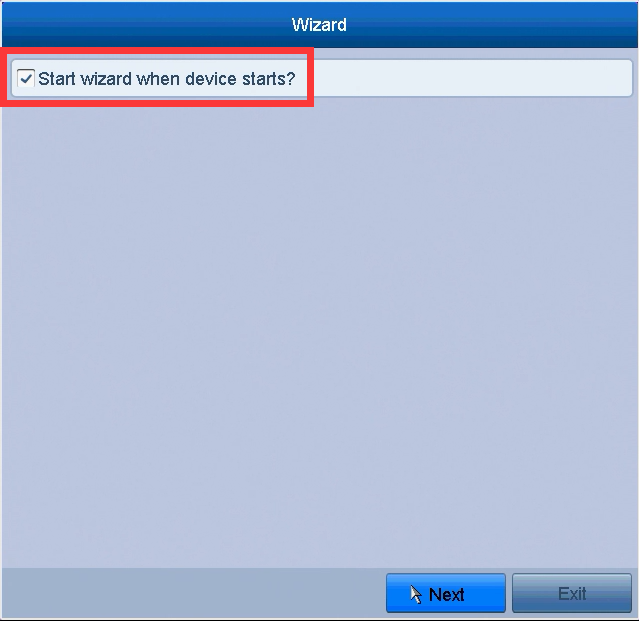
1. After a reboot of the video recorder, untick the option ”Start wizard when device start”.
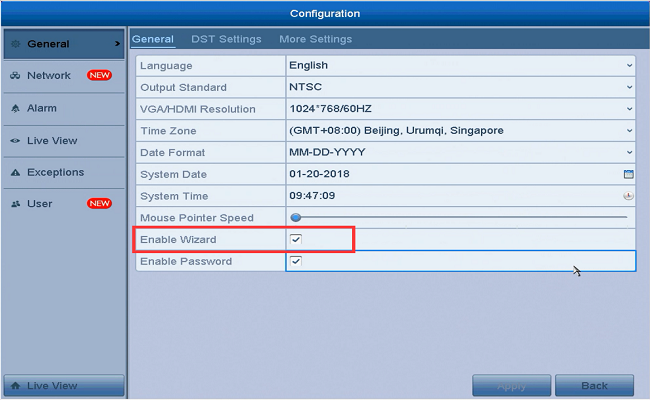
2. Please log into your system and go to Menu - Configuration - General - General, and untick ”Enable Wizard”.
Was this article helpful?
Bu bilgiler sorununuzu çözmeye yardımcı oldu mu?
Thanks for your feedback!
Still need help?
Uzman ekibimiz size yardımcı olmak için burada.