How Do I Disable the Beep on my NSC-DB2 Video Doorbell When Someone Walks By?
20 Aug 2026
348 views
As a security feature to warn potential porch pirates or would be intruders, the doorbell has a feature which outputs a very loud beep when the PIR alarm is activated. While some people may find this useful, others may find it annoying. Here is how you can turn it off:
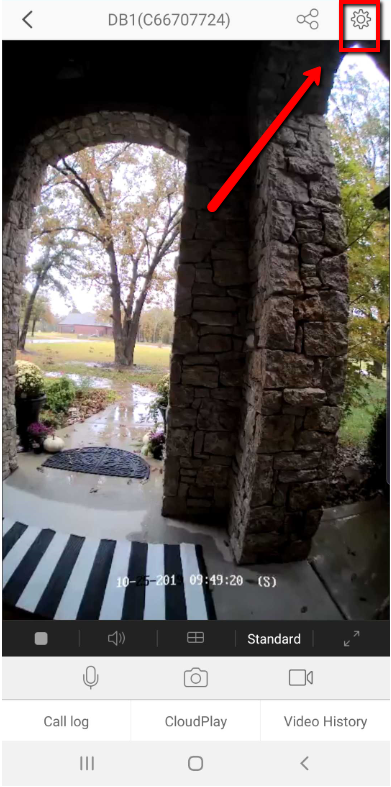
Open up your EZviz App and go to the live view of your doorbell. From there, click on the gear icon to enter into the doorbells settings:
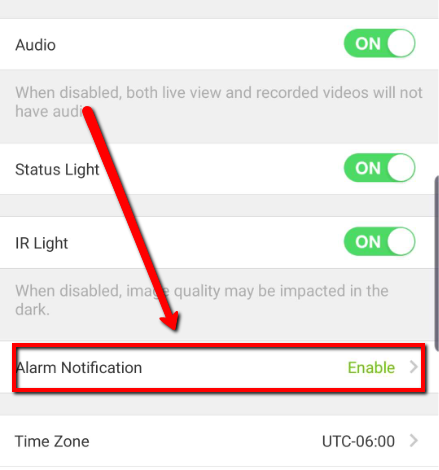
Click "Alarm Notification"
Choose "mute" under the "Select the mode" setting:
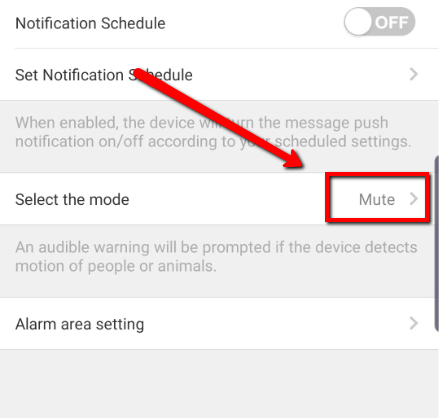
Your doorbell should now stop beeping anytime someone walks by.
Was this article helpful?
Bu bilgiler sorununuzu çözmeye yardımcı oldu mu?
Thanks for your feedback!
Still need help?
Uzman ekibimiz size yardımcı olmak için burada.