How to Factory Default a Speco One Series Recorder
20 Aug 2026
410 views
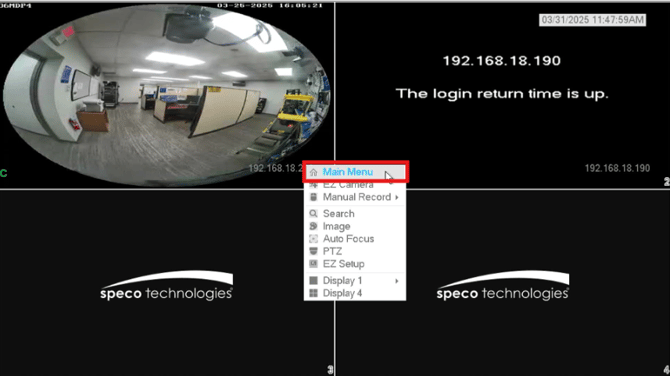
- Right click on the live view screen and then click Main Menu
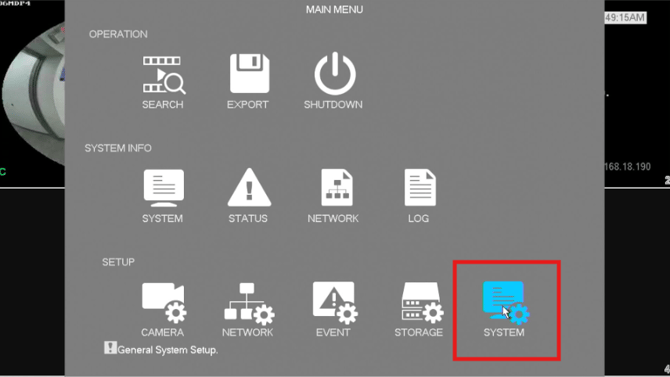
- Towards the bottom right of the menu, click System
- On the left side menu, click on Default
- Select each option you would like to factory reset on the machine
- Click Factory Reset to initiate the reset

Note: A factory default will reset the entire recorder unit to its default factory settings. Any previous setting changes will be lost. The unit's recorded data will remain untouched.
Initial submission Date: March 18, 2025

Article authored by: Michael Pagano, Tier 1
- Right click on the live view screen and then click Main Menu
- Towards the bottom right of the menu, click System
- On the left side menu, click on Default
- Select each option you would like to factory reset on the machine
- Click Factory Reset to initiate the reset
Note: A factory default will reset the entire recorder unit to its default factory settings. Any previous setting changes will be lost. The unit's recorded data will remain untouched.
Initial submission Date: March 18, 2025

Article authored by: Michael Pagano, Tier 1
Was this article helpful?
Bu bilgiler sorununuzu çözmeye yardımcı oldu mu?
Thanks for your feedback!
Still need help?
Uzman ekibimiz size yardımcı olmak için burada.