How to Flip/Mirror a Camera Image on a Speco Blue Recorder
20 Aug 2026
384 views
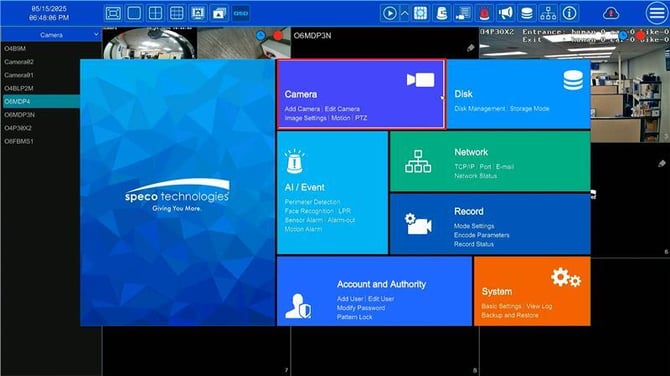
- Go to Settings > Camera > Image Settings
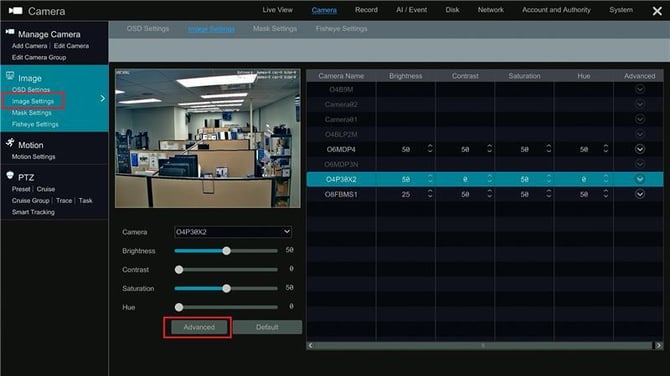
- Select the desired camera and click on Advanced
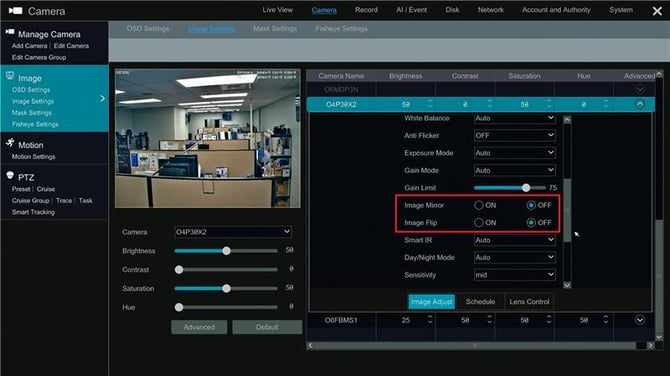
- Scroll down the options to Image Mirror and Image Flip.
- To toggle these options, click the on or off button to meet your preferences.
Initial submission Date: January 3, 2025

Article authored by: Michael Pagano, Tier 1
- Go to Settings > Camera > Image Settings
- Select the desired camera and click on Advanced
- Scroll down the options to Image Mirror and Image Flip.
- To toggle these options, click the on or off button to meet your preferences.
Initial submission Date: January 3, 2025

Article authored by: Michael Pagano, Tier 1
Was this article helpful?
Bu bilgiler sorununuzu çözmeye yardımcı oldu mu?
Thanks for your feedback!
Still need help?
Uzman ekibimiz size yardımcı olmak için burada.