How to have Multiple Users accessing the O2DB1 camera on the Speco Blue App
20 Aug 2026
369 views
- If needed, here is a guide to Adding the O2DB1 to the Speco Blue App
- After successfully pairing the camera, go the Server List in the top right corner
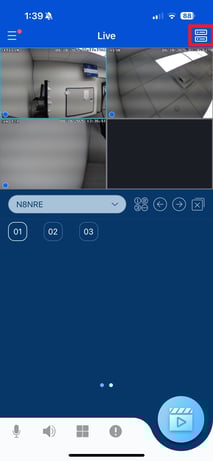
- Tap the Share Icon for the doorbell
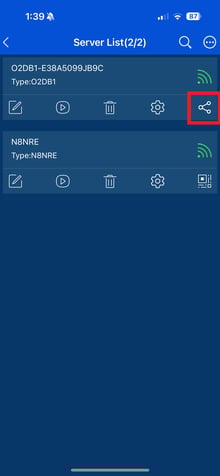
- Enter the email address of the person's Speco Blue account you want to share the doorbell with
- Click Next Step
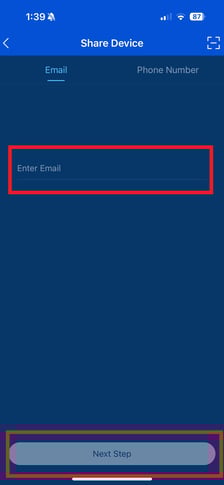
- Click Next Step
- Check the box next to the doorbell and select weather or not the user can view playback
- Click Finish
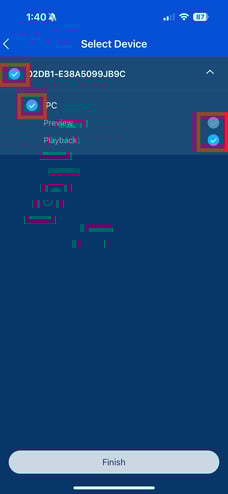
- Click Finish
- Now the user has to go to Server List > Settings > Sharing Manager > Shared By Others
- Here the user will accept the shared source from the original user
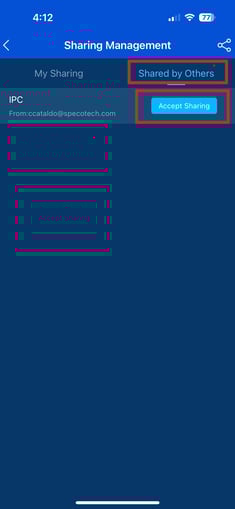
- Here the user will accept the shared source from the original user
- The original user can also review, edited and revoke access by also going to:
- Server List > Settings > Sharing Manager
- Server List > Settings > Sharing Manager
Initial submission Date: April 18, 2025

Article authored by: Christopher Cataldo, Technical Support Lead
- If needed, here is a guide to Adding the O2DB1 to the Speco Blue App
- After successfully pairing the camera, go the Server List in the top right corner
- Tap the Share Icon for the doorbell
- Enter the email address of the person's Speco Blue account you want to share the doorbell with
- Click Next Step
- Click Next Step
- Check the box next to the doorbell and select weather or not the user can view playback
- Click Finish
- Click Finish
- Now the user has to go to Server List > Settings > Sharing Manager > Shared By Others
- Here the user will accept the shared source from the original user
- Here the user will accept the shared source from the original user
- The original user can also review, edited and revoke access by also going to:
- Server List > Settings > Sharing Manager
- Server List > Settings > Sharing Manager
Initial submission Date: April 18, 2025

Article authored by: Christopher Cataldo, Technical Support Lead
Was this article helpful?
Bu bilgiler sorununuzu çözmeye yardımcı oldu mu?
Thanks for your feedback!
Still need help?
Uzman ekibimiz size yardımcı olmak için burada.