How To Install And Format MicroSD Card
Internal Storage is quite nice in case if you either do not have an NVR or would like some redundancy in footage stored.
All H-series IP cams with MicroSD card support can use up to a 128gb MicroSD Card.
In this guide, we will be using the NSC-245W-C.
Step 1. Install The MicroSD Card
Depending on your camera, whether its a Dome, Bullet, Turret, Cube, PTZ, Each camera has a specific spot for a microSD card. It is typically near the reset button to the camera.
Here is where you can find it on the Cube Camera: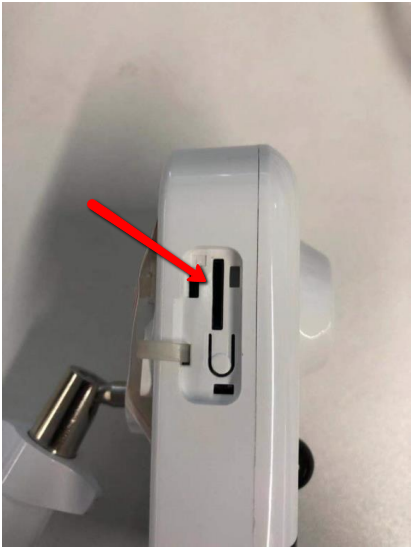
Once installed, Connect the Cube camera to your network.
Step 2. Pull Up Web Interface To Camera
Once logged in using Internet Explorer, Go to Configuration -> Storage -> Storage Management, and then format the SD card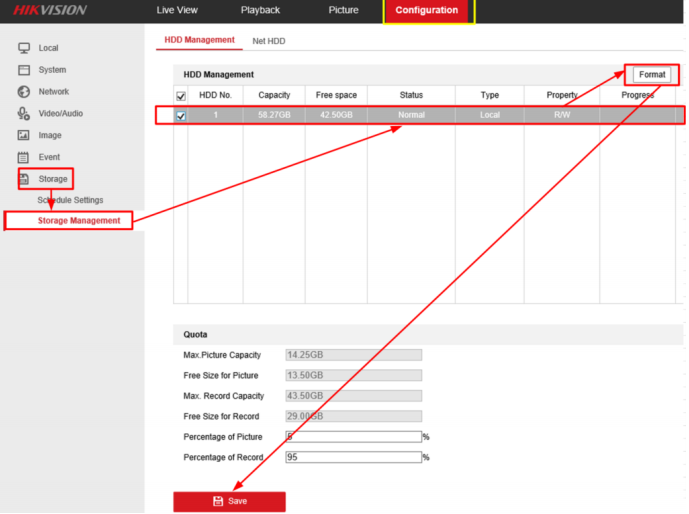
The Progress Bar will fill until 100%, then the Status will show Normal.
If you do not know how to access the web interface, please follow this guide -> Guide
Was this article helpful?
Bu bilgiler sorununuzu çözmeye yardımcı oldu mu?
Still need help?
Uzman ekibimiz size yardımcı olmak için burada.