How to verify ONVIF compatibility with Speco Cameras
20 Aug 2026
368 views
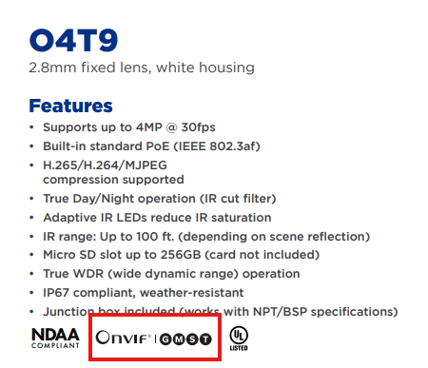
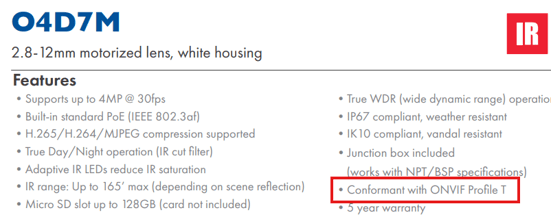
- Option #1: Spec Sheet
- ONVIF support will typically be listed under the "Features" section of the spec sheet.
- It will either be listed in text or with the ONVIF logo followed by the profiles it supports circled.
- Option #2: ONVIF Website: https://www.onvif.org/conformant-products/
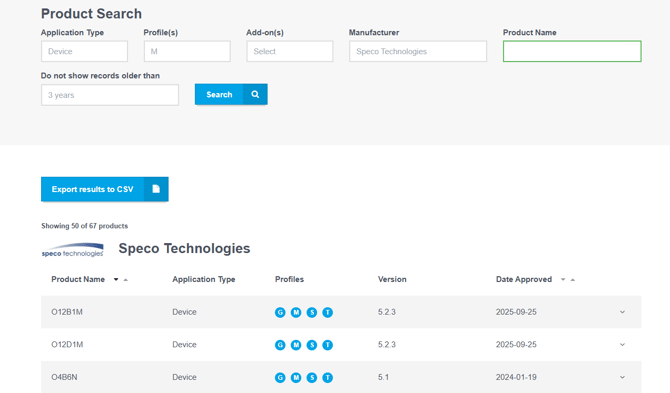
- Once on this page select application type as "device",
- Select
- Desired ONVIF profiles
- Manufacturer: Speco Technologies
- Click Search
- All compatible Speco cameras will then be listed.
Initial submission Date: October 10, 2025

Article authored by: Michael Pagano, Technical Support Agent - Tier 1
- Option #1: Spec Sheet
- ONVIF support will typically be listed under the "Features" section of the spec sheet.
- It will either be listed in text or with the ONVIF logo followed by the profiles it supports circled.
- Option #2: ONVIF Website: https://www.onvif.org/conformant-products/
- Once on this page select application type as "device",
- Select
- Desired ONVIF profiles
- Manufacturer: Speco Technologies
- Click Search
- All compatible Speco cameras will then be listed.
Initial submission Date: October 10, 2025

Article authored by: Michael Pagano, Technical Support Agent - Tier 1
Was this article helpful?
Bu bilgiler sorununuzu çözmeye yardımcı oldu mu?
Thanks for your feedback!
Still need help?
Uzman ekibimiz size yardımcı olmak için burada.