Sip configuration in X-Security generation 1.0 video door phones
As in the previous articles, it is explained how to configure the SIP option in both VTO and VTH (namely external boards and internal monitors). The boards are configured from their own web server, while for the monitors operations are executed locally on the machine.
VTO Configuration
First of all we must have the corresponding firmware version:
For the configuration of the devices we have to do the following:
The server type is selected within the VTO.
The IP address of the video door phone is automatically added.
The number of monitors is added below
The IP address associated to the board is shown below:
SIP activation takes place from the below-shown menu; the device will restart right after confirming the modification:
VTH configuration:
First, IP communication is established:
In the SIP configuration, set the IP of the VTO to the default port 5060, while on Register Pwd leave the default password.
In User Name and Pwd Login, you don't have to put anything. Then switch to the ON position the status bar.
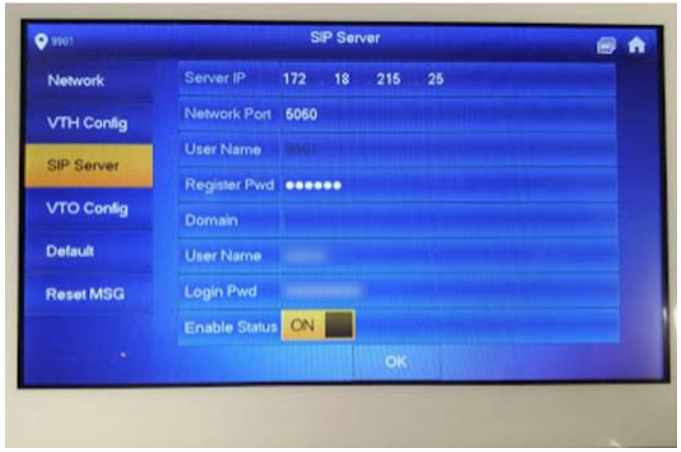
Make sure that the VTO's IP address and credentials are stated, in order to correctly establish communications between the devices:
To receive notifications on phones, it's enough to scan the code of the device's label from the app:
To receive the call on your phone, activate the following option
Was this article helpful?
Bu bilgiler sorununuzu çözmeye yardımcı oldu mu?
Still need help?
Uzman ekibimiz size yardımcı olmak için burada.