TP Link - Tapo - Why can’t I receive notifications after turning on Notifications?
Step 1 Check and confirm Notifications setting on your phone is enabled.
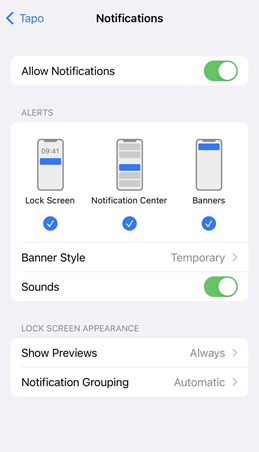
For iOS: Launch Settings -> Notifications, ensure Show Previews is on Always, and the Allow Notifications for the Tapo App is on.
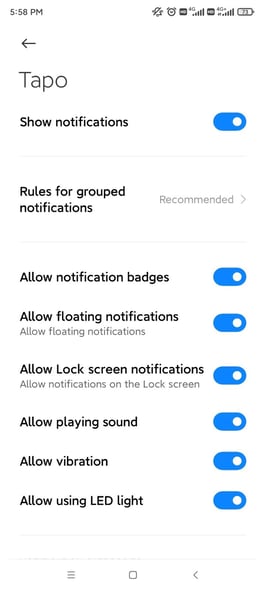
For Android: Launch Settings -> Notifications & status bar -> App notifications, locate the Tapo App and ensure the Show notifications option is on.
Step 2 Turn off Do Not Disturb
For iOS: Go to Settings and tap Do Not Disturb, then tap on the switch next to Do Not Disturb to turn it off.

For Android: Launch Settings -> Sound&vibration -> Do not disturb, locate the Do not disturb option is Off.

Step 3 Check and ensure the Wi-Fi & Cellular connection on the phone is working properly.
Please contact TP-Link technical support with the following information if you still encounter push notification issues after the above suggestions.
1) Your TP-Link ID or cloud account;
2) The brand&model of your phone and its Android/IOS version;
3) Whether you have tried all suggestions listed above or not. If yes, what are they?
Was this article helpful?
Bu bilgiler sorununuzu çözmeye yardımcı oldu mu?
Still need help?
Uzman ekibimiz size yardımcı olmak için burada.