Type 1-How to set up and playback recordings for SANNCE security system?
Applies to:
DL41B/DL81B/DL41A/DL81A/DL41D/DL81D/DH81S/DH81X/DH81NG/DM41D/DM41A/DM81A/DN41D/DN81D/DN41S/DN41NA/DM41H/DM81H/DM21O/DM31O/DE41N/DE81N/DN81NB/DM81Z/DM61W/DG81CP/DG81CQ/DH81NK/DG81CR/DH41NK/DM41G/DN41CJ/DN81BJ/DN61EC/DG81W/DG61X/DG41T/DT81DQ/DT41DC/DT61ER/DG41BE/DG81BE/NP41F/N43SU/N44SU/N48PZ/N481U/N441U/N44PBD/N461W/N48PAU
The recorder needs to install an internal HDD for recording videos. Without a HDD, the system can only show live viewing, but cannot record and playback.
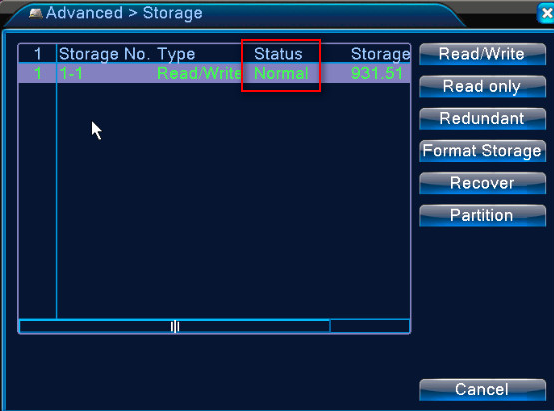
First of all, please go to [Main Menu]-[Advanced]-[Storage] to check if the HDD's status is normal. When you install it for the first time, you need to format. Please click [Format storage].
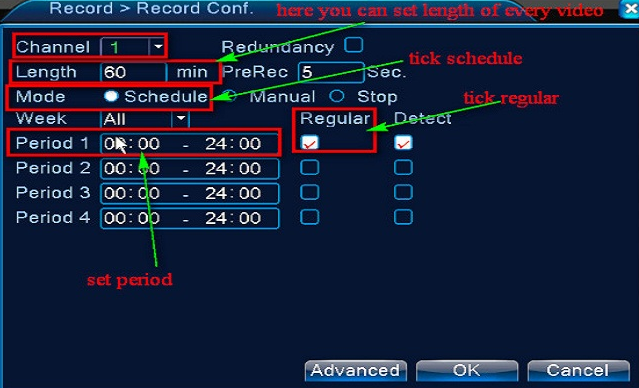
Click [Main Menu]-[Record]-[Record Conf.] to enter the setting interface for video configuration. Please select channel, click the schedule mode, set the period and tick Regular, Detect and Alarm.
Return to the last setting page and click [Playback] to watch the video playback. Select date and channel, and then click the play icon to play back the videos.
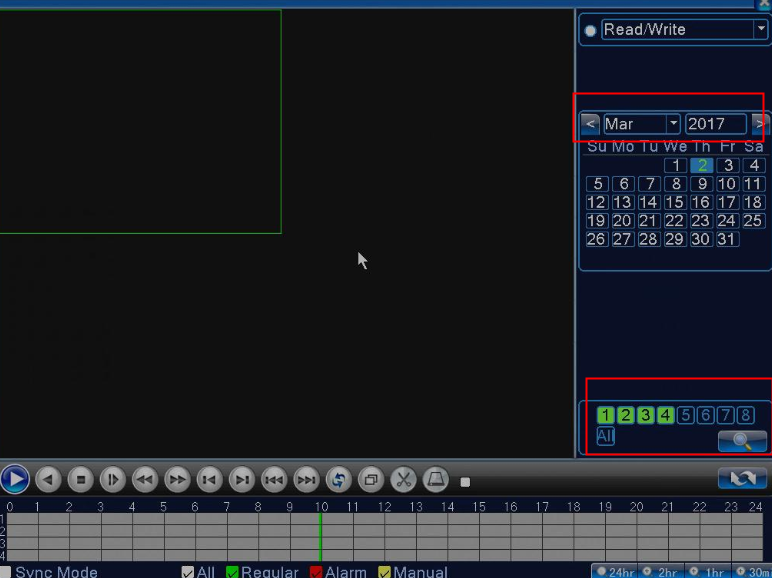
Please note that the different colors in the progress bar stand for different recording modes. Since only one channel can be played, you need to click to stop playing this one first if you want to play another. Select another channel you want to play.
Was this article helpful?
Bu bilgiler sorununuzu çözmeye yardımcı oldu mu?
Still need help?
Uzman ekibimiz size yardımcı olmak için burada.