[VAST2][2.0.0.1650]How to do when UI is transparent?
20 Aug 2026
310 views
QUESTION
VAST2 UI (version: 2.0.0.1650) is transparent on Windows 10 of Hyper-V VM. I can see overlap issue between UI and shortcuts on desktop.

ANSWER
Please follow below steps to solve the issue.
1. Go to "Display Setup" file location.
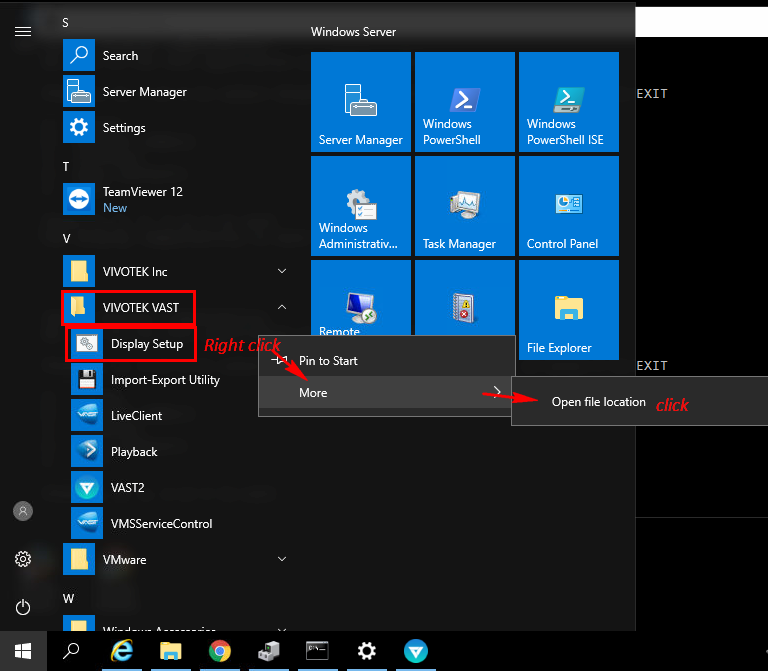
2. Right click "Display setup" and run as administrator.

3. You will see Display setup window and then Press A.

Finished above steps, VAST2 UI will not be transparent.
1. Go to "Display Setup" file location.
2. Right click "Display setup" and run as administrator.
3. You will see Display setup window and then Press A.
Finished above steps, VAST2 UI will not be transparent.
Was this article helpful?
Bu bilgiler sorununuzu çözmeye yardımcı oldu mu?
Thanks for your feedback!
Still need help?
Uzman ekibimiz size yardımcı olmak için burada.