Why Does the Recorder Keep Beeping
19 Aug 2026
347 views
DVR4-4480G, DVR4-4480RN, DVR4-4480V, DVR4-4580G, DVR4-4580RN, DVR4-4580V, DVR4-4680, DVR4-4680RN, DVR4-4685, DVR4-4685RN, DVR4-4780V, DVR4-4980V, DVR4-5580, DVR4-5580G, DVR4-5580RN, DVR4-5680, DVR4-5680RN, DVR8-4480G, DVR8-4480RN, DVR8-4480V, DVR8-4580G, DVR8-4580RN, DVR8-4580V, DVR8-4680, DVR8-4680A, DVR8-4680RN, DVR8-4685, DVR8-4685RN, DVR8-4780V, DVR8-4880RN, DVR8-4980, DVR8-5580, DVR8-5580A, DVR8-5580G, DVR8-5580RN, DVR8-5580RU, DVR8-5680, DVR8-5680A, DVR8-5680RN, DVR8-5680RU, DVR8-5880RU, DVR16-4580G, DVR16-4580RN, DVR16-4580V, DVR16-4680, DVR16-4680A, DVR16-4680RN, DVR16-4680RU, DVR16-4880RU, DVR16-4980, DVR16-5580, DVR16-5580G, DVR16-5580G2, DVR16-5580RU, NVR8-8580, NVR8-8580RN, NVR8-8600RU, NVR8-8780, NVR8-8780RN, NVR16-8580, NVR16-8580RN, NVR16-8600RU, NVR16-8780, NVR16-8780RN, NVW-650, NVW-800, NVW-MR4K, DVR4-4680XN, DVR4-4680XU, DVR4-4685XU, DVR4-5680XN, DVR8-4680X, DVR8-4680XN, DVR8-4680XU, DVR8-4685XU, DVR8-5680X, DVR8-5680XU, NVR8-ADVANX, NVR16-ADVANX
This article applies to recorders that emit a beeping sound whenever there is any of the following:
- Motion detection: Buzzer is enabled; check the Alarm detection settings.
- No Space on Disk: Overwrite is disabled; check the settings to enable Overwrite.
- Disk Error: can be HDD is not detected; may need to format if it is still detected.
- Video Loss: camera is not detected or camera is not connected via the recorder's VIDEO IN / channel port.
Check the Alarm Detection settings via Main Menu
- Access Menu then go to Alarm > Detection > Actions > Buzzer.
- On each channel, Disable the Buzzer to your desire. If enabled, it triggers to buzzer to alert you. whenever the camera detects movement.
- Click on Save to save the settings.
If there is still beeping, continue below.
Check the Advanced settings via Main Menu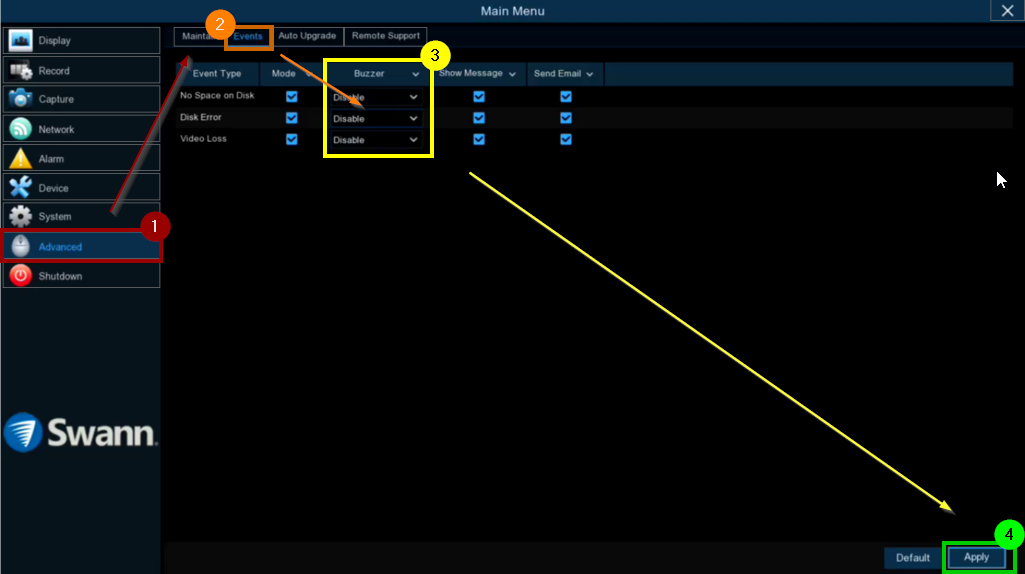
- Access Menu then go to Advanced > Events.
- On each Event Type, the Buzzer should be OFF to
your desire. - Click on Save to save the settings.
Both settings can also send email; therefore, if the issue is similar but via email, check the same settings.
If you still hear a long continuous beep even after disabling Buzzer for all settings above, proceed to this article: Swann Recorders Hardware Noises - What does it mean?
Was this article helpful?
Bu bilgiler sorununuzu çözmeye yardımcı oldu mu?
Thanks for your feedback!
Still need help?
Uzman ekibimiz size yardımcı olmak için burada.