Annke Nova - What to Do If Your Mobile Phone Makes No Sound When Cofiguring Nova Camera?
Applies to: I41HG/I41CS
Purpose: Nova S (I41HG) or Nova Orion (I41CS) supports sound wave pairing. During the pairing process, your mobile phone will make a sound after you click the sound wave sending button. However, a few customers using Samsung S8 and S9 phones comment that their mobile phone makes no sound. Here is the instruction to help you with how to fix this problem.
Steps:
1. Please go to the mobile apps management interface and select the ANNKE Nova app.

2. Select "permissions".
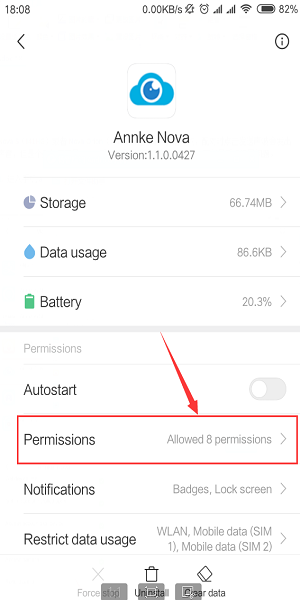
3. Check the storage permissions, tick on "Access and change files on internal storage" and save the settings.

Finally, please try to add the device again. At this time, your mobile phone will make a sound after you click the sound wave sending button.
Was this article helpful?
Bu bilgiler sorununuzu çözmeye yardımcı oldu mu?
Still need help?
Uzman ekibimiz size yardımcı olmak için burada.