Annke Sight - How to Change the System Language?
20 Aug 2026
389 views
Applies to:
N441B/N441H/N441L/N441K/N44PAN/N44WED/N44WEC/N44WEB/N34WDD/N34WBB/N34WDB/N28WEB/N44WBD/N48WHD/N48WHF//N48WHP/N48WHE
Purpose: This instruction is to help you with how to change the language of the system.
Steps:
1. Please right click your mouse, and then click "System setup".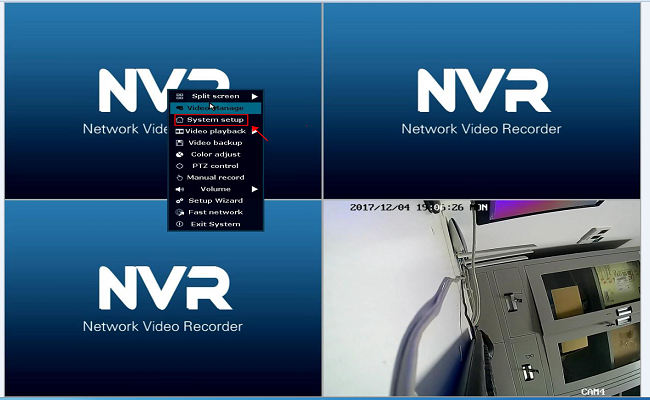
2. Then you will see the system setup menu, please go to General setup-General setup-Language to change the language.
If the language of your NVR is Chinese or another language you don't know, you can just refer to the picture to find the location to change the language.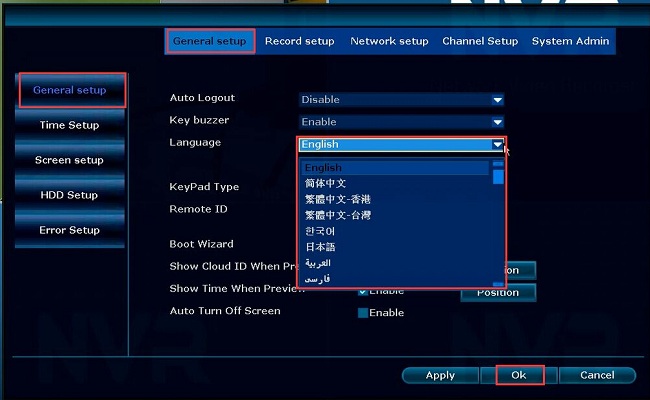
Was this article helpful?
Bu bilgiler sorununuzu çözmeye yardımcı oldu mu?
Thanks for your feedback!
Still need help?
Uzman ekibimiz size yardımcı olmak için burada.