Annke Sight - How to Upgrade NVR's Firmware Version?
20 Aug 2026
389 views
Applies to:
N441B/N441H/N441L/N441K/N44PAN/N44WED/N44WEC/N44WEB/N34WDD/N34WBB/N34WDB/N28WEB
1. Contact support@annke.com to ask for the new firmware file.
2. Copy the new firmware file to a USB flash drive.
Note:
1. The USB flash drive should be in the FAT32 format. If not, please format it on the computer first.
2. The file type of the firmware should be .rom. If it's .zip, please open it on the computer to find the .rom file.
3. Insert USB hard drive to NVR‘s USB port.
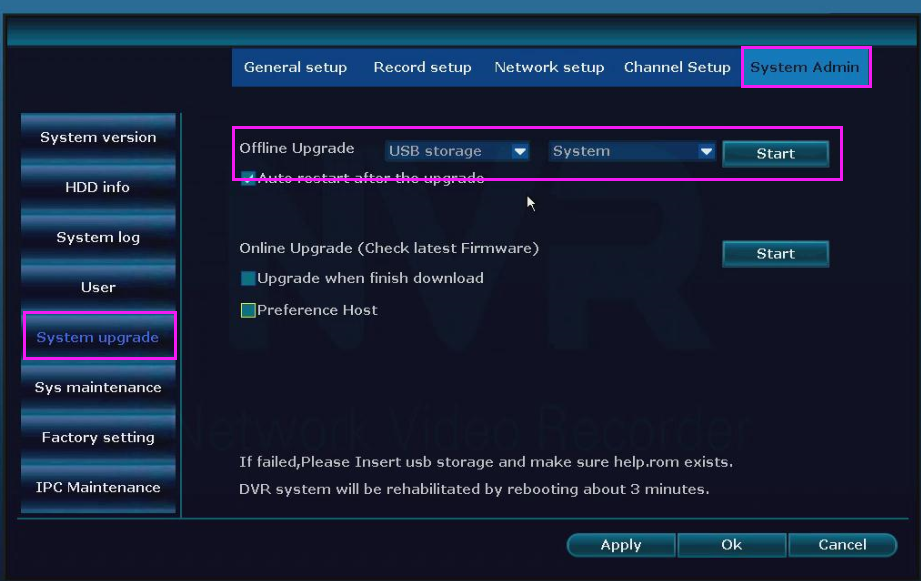
4. Go to setting to select the file and upgrade.


If your NVR menu is a blue interface, pls refer to this method:
Was this article helpful?
Bu bilgiler sorununuzu çözmeye yardımcı oldu mu?
Thanks for your feedback!
Still need help?
Uzman ekibimiz size yardımcı olmak için burada.