Annke Sight -- Troubleshooting -- the Video Signal is Too Weak
Applies to: NW41V/N441H/N441K/N28WEB/N441B/N441D/N441L/N44PAN/N44PAJ/N34WDB/N34WDD/N44WEB/N44WED/N44WEC/NW41V/N44WBD/N48WHP/N48WHE
There are several possible causes for the camera's wifi signal is too weak. You may follow the troubleshooting tips listed below to solve the problem.
Before you start: The camera should connect to the NVR by its own wifi.
Cause 1. The antennas of the Wi-Fi NVR and the Wi-Fi IP camera are loose
Solution: Try to fix the antennas manually and adjust their angles.
Cause 2. The WiFi camera is too far away from the Wi-Fi NVR
Solution: Try to move the Wi-Fi IP camera closer to the NVR.
Cause 3. The camera‘s wifi signal is too weak
Solution: Use another camera which signal will be better, act as a bridge to connect the weak signal camera to the NVR. Please click this link to view how to make a bridge to enhance the camera signal.
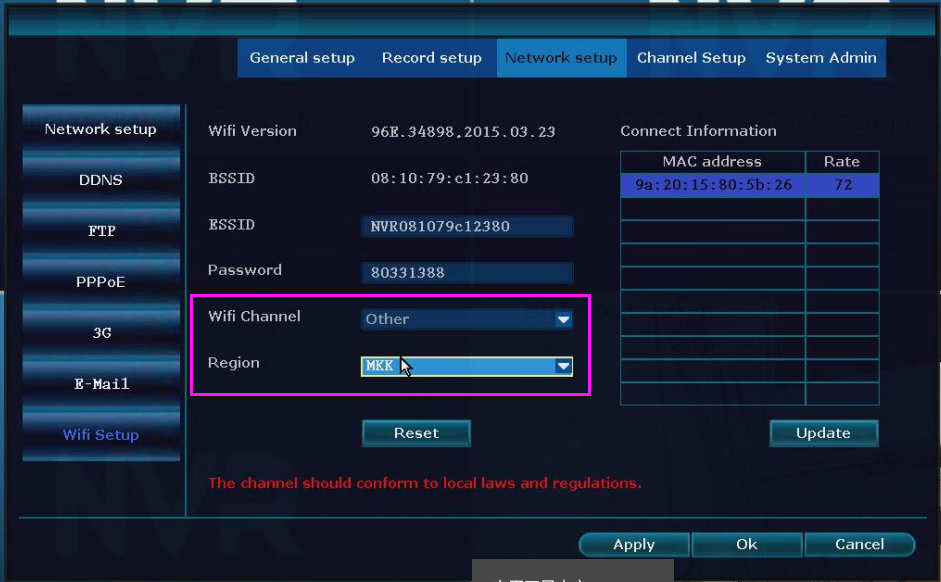
Cause 4. The WiFi Channel is busy
Solution: Try to switch to another Wifi Channel, Choose the Region first and set another Wifi channel.
Cause 5. The obstacle(such as a wall) between the NVR and the camera influences the signal.
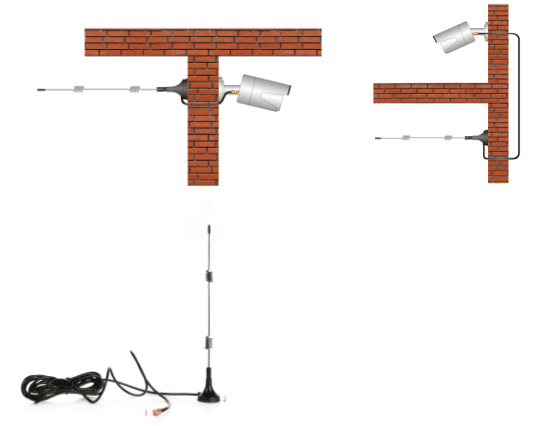
Solution: Use a radio antenna extension line(3 meters long).
If you have to change the antenna with the 3-meters Radio antenna extension line, please restart the camera to reconnect.
- If the problem persists after going through the steps above, please tell us what steps you have taken and the corresponding troubleshooting results and send it to us as an attachment so that we can help you solve the problem better.
- Please click the link to contact our support team for additional help by submitting a request.
Was this article helpful?
Bu bilgiler sorununuzu çözmeye yardımcı oldu mu?
Still need help?
Uzman ekibimiz size yardımcı olmak için burada.