Annke Vision - Exporting Network Packet on Annke DVR/NVR
19 Aug 2026
376 views
Applies to:
DT41Y/DT61Y/DT81Y/DN41R/DN61R/DN81R/DT41GB/DT81GB/DT61GB/DT41DB/DT81DB/DT61EQ/DW41JD/DW81KD/DW61LD/DT81DP/N48PI/N44PI/N46PI/N44PAM/N48PAW/N46PCK/N88PCH/N441Y/N481Y
Purpose:
By connecting the DVR to network, the captured network data packet can be exported to USB-flash disk, SATA and other local backup devices.
Before you start:
- You should log in to your device.
- Click Menu > Maintenance > Net Detect.
Steps:
- Click the Network Detection tab to enter the Network Detection interface.
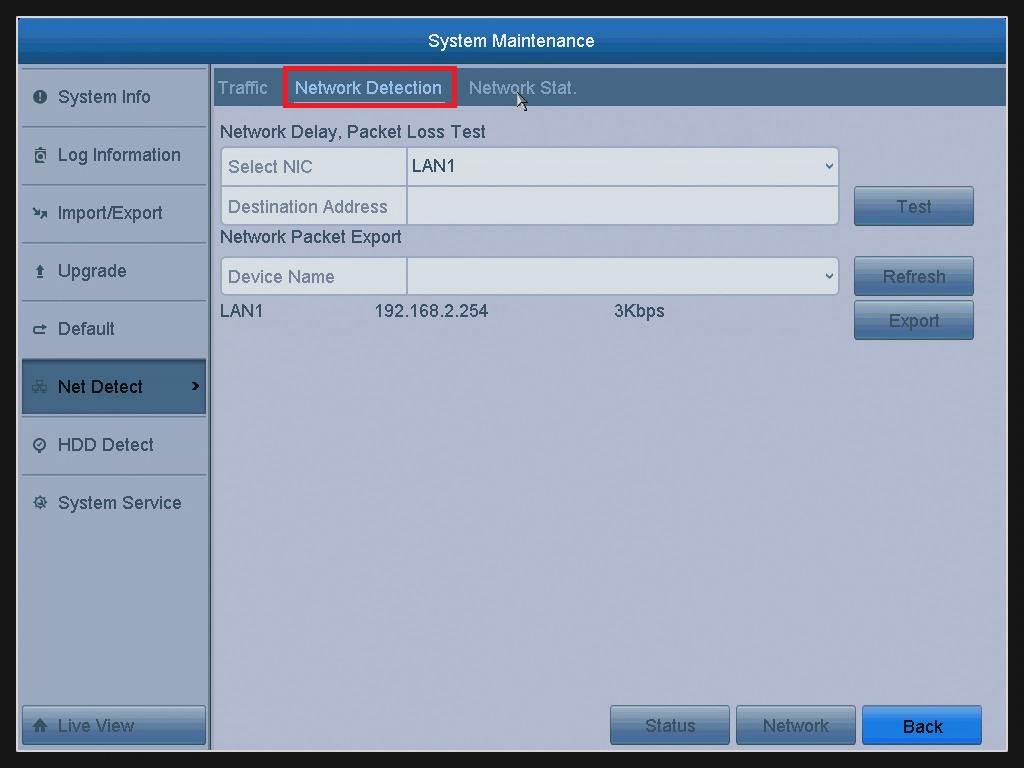
- Select the backup device from the drop-down list of Device Name.
Note:
Click the Refresh button if the connected local backup device cannot be displayed. When it fails to detect the backup device, please check whether it is compatible with the DVR. You can format the backup device if the format is incorrect. - Click the Export button to start exporting.
- After the exporting is complete, click OK to finish the packet export.
Note: Up to 1M data can be exported each time
Was this article helpful?
Bu bilgiler sorununuzu çözmeye yardımcı oldu mu?
Thanks for your feedback!
Still need help?
Uzman ekibimiz size yardımcı olmak için burada.