Annke Vision - How to Adjust the Output Resolution of The System to The Monitor for a More Clear Image?
20 Aug 2026
409 views
Applies to:
DT41Y/DT61Y/DT81Y/DN41R/DN61R/DN81R/DT41GB/DT81GB/DT61GB/DT41DB/DT81DB/DT61EQ/DW41JD/DW81KD/DW61LD/DT81DP/N48PI/N44PI/N46PI/N44PAM/N48PAW/N46PCK/N88PCH/N441Y/N481Y/S500/S300/FC200/C800/C500/B1200/NC400/CZ500/ CZ400/ Pano360 Pro
Here are the steps for you:
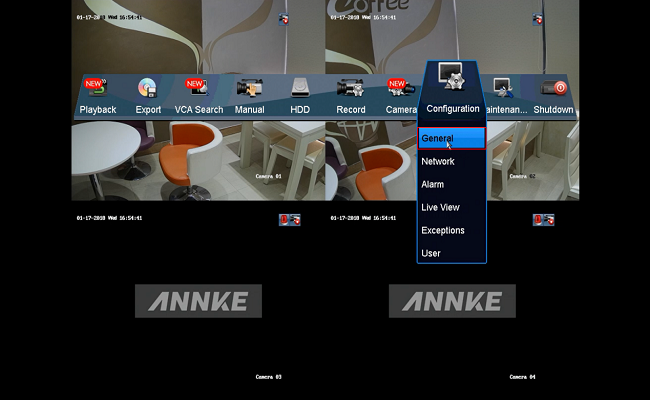
- Open the DVR's or NVR's menu, click "Configuration"
- Select "General"
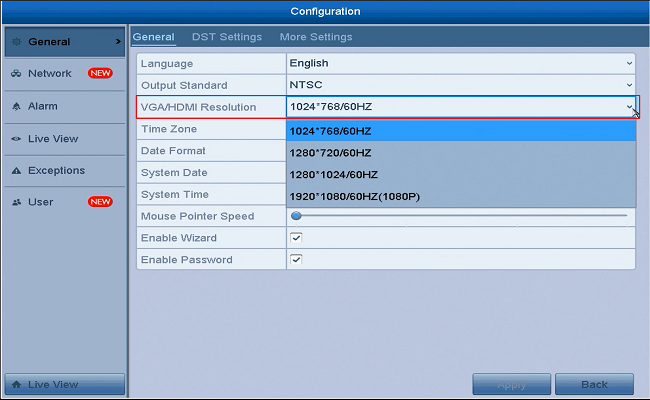
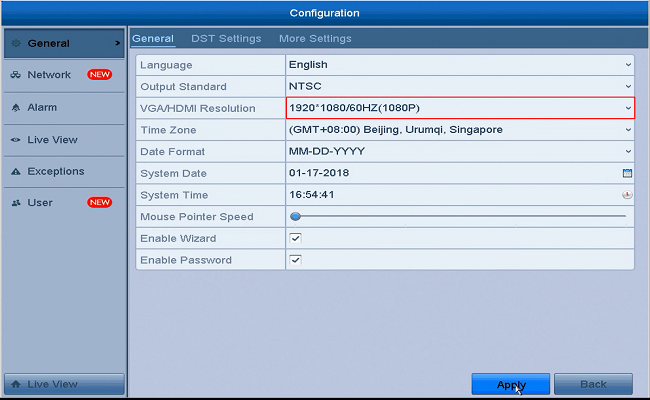
- Select the appropriate VGA & HDMI output resolution for your monitor, and click "Apply" to save the settings

Was this article helpful?
Bu bilgiler sorununuzu çözmeye yardımcı oldu mu?
Thanks for your feedback!
Still need help?
Uzman ekibimiz size yardımcı olmak için burada.