Annke Vision - How to Find The Camera's IP Address?
20 Aug 2026
335 views
Applies to: I21AE/I21AF/I41CS/I41HG/I51DJ/I51DB/I51DK/I61DQ/I61DS/I61FB/I61FC/I61DE/I61BK/I81FB/I91BD/I91BF/I91BE/C800/C500/B1200/NC400/CZ500/CZ400/Pano360 Pro
Here are the steps for you:
- Please use an ethernet cable to connect the camera to your home touter directly.
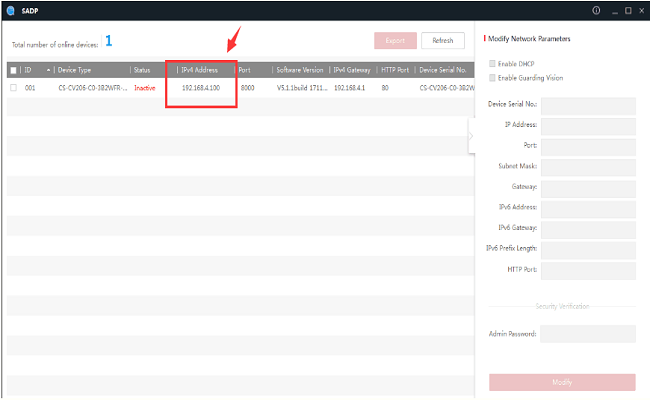
- Please install the search tool SADP and detect the IP of this camera on the computer, which is in the same network as the camera.
For Windows: https://download.annke.com/CMS/SADP_v3.0.2.4.zip
For MacBook: http://support.annke.com/document/Computer%20Software/sadptool.pkg_.zip - Then you can find the camera's IP address like this picture shows.
Was this article helpful?
Bu bilgiler sorununuzu çözmeye yardımcı oldu mu?
Thanks for your feedback!
Still need help?
Uzman ekibimiz size yardımcı olmak için burada.