Annke Vision-How to Finish the Setup Wizard? (H800)
Apply to: N48PAW/N46PCK/H800
Introduction:
The setup wizard can help the user preconfigure the NVR. In this article, we will show you how to finish all the procedures.
Steps:
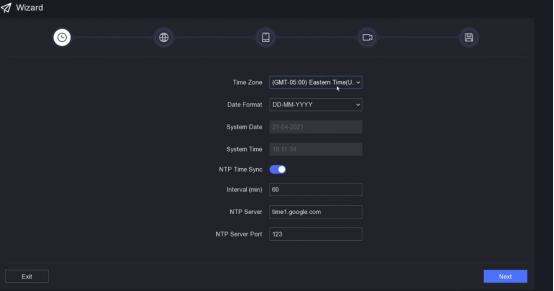
1. Fill in the correct time information. Then click 'Next'.
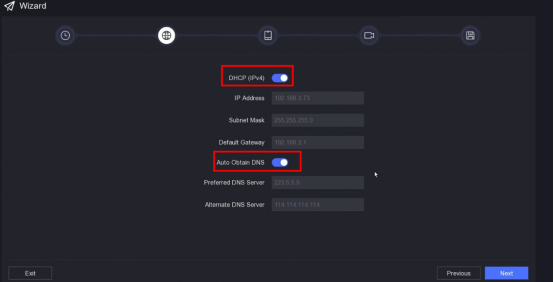
2. Enable 'DHCP' and 'Auto Obtain DNS'. Then click 'Apply'.
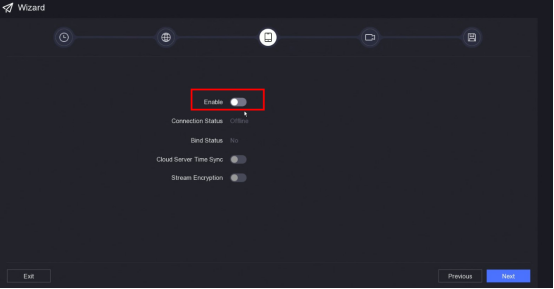
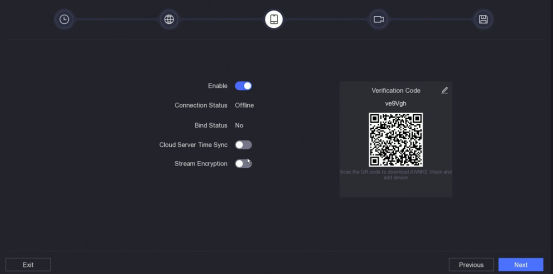
3. Enable 'P2P network connection'. Then click 'Next'.
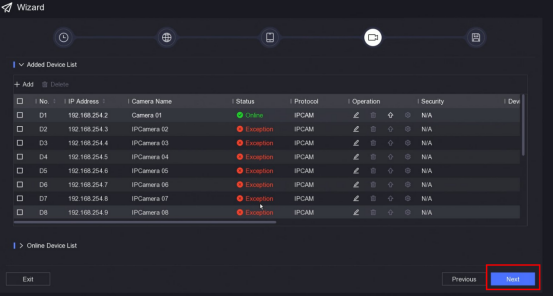
4. If the cameras are connected to the NVR, the 'Status' will be 'Online'. Please click 'Next'.
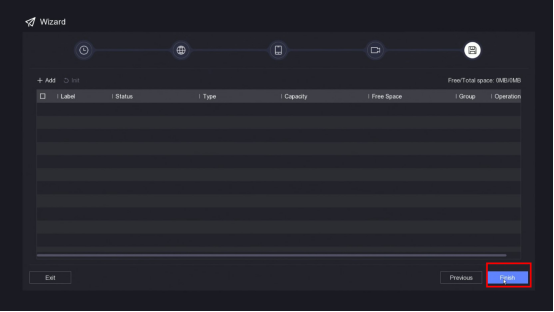
5. If the HDD is connected to the NVR, the NVR will display the HDD information. Please click 'Finish'.
If you have any other questions, please contact ANNKE technical support at support@annke.com by email.
If this article is helpful to you, please click the "helpful" button after you review it. Any comments would be appreciated.
Was this article helpful?
Bu bilgiler sorununuzu çözmeye yardımcı oldu mu?
Still need help?
Uzman ekibimiz size yardımcı olmak için burada.