Annke Vision-How to Make The IP Camera Record Audio on The Web Browser?
Apply to: I91BK/I51DL/I51DN/I51DP/I91BM/I91BN/I91BL/I91BQ/CZ400
Introduction:
For the ANNKE Standalone PoE IP Camera with the built-in microphone, the camera is allowed to record audio at the same time. In this article, we will show you how to make the IP camera record audio.
Steps:
1. Please access the setting menu of the camera on the web browser from the PC. The link below has the detailed introductions.
https://help.annke.com/hc/en-us/articles/900003867006
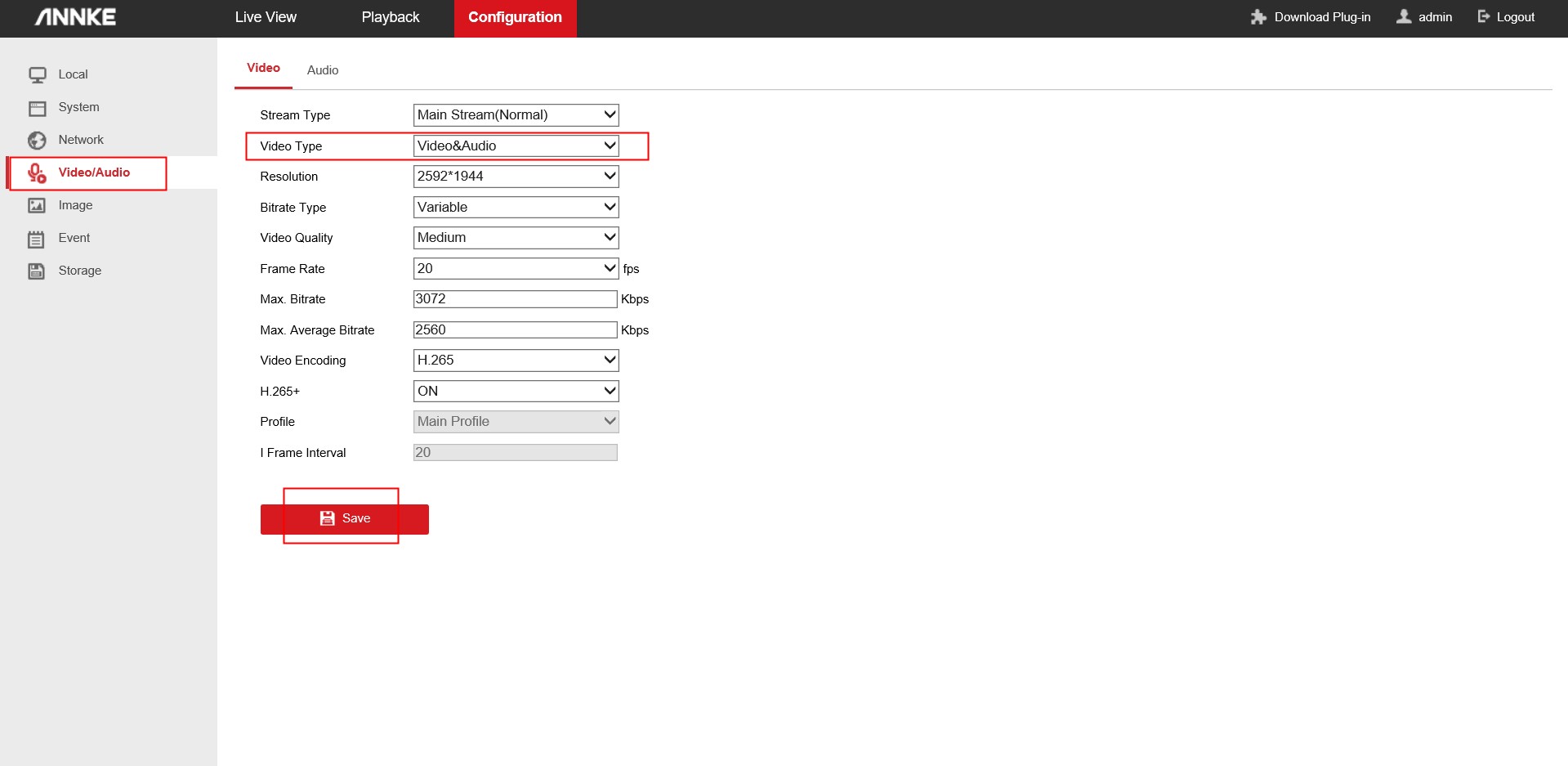
2. Please go to ‘Configurations→Video/Audio’ and set the ‘Video Type’ to ‘Video&Audio’. Then click ‘Save”.
Notice:
For any other questions, please feel free to contact ANNKE technical support at support@annke.com by email.
If this article is helpful to you, please click the "helpful" button after you review it. Any comments would be appreciated.
Was this article helpful?
Bu bilgiler sorununuzu çözmeye yardımcı oldu mu?
Still need help?
Uzman ekibimiz size yardımcı olmak için burada.