Annke Vision - How to set up DST for NVR and DVR?
Applies to:
DT41Y/DT61Y/DT81Y/DN41R/DN61R/DN81R/DN31GN/DT41GB/DT81GB/DT61GB/DT41GB/DT81GB/DT41DB/DW41JD/DW81KD/DW61LD/DT81DP//N48PI/N44PI/N46PI/N44PAM/N48PAW/N46PCK/N88PCH/N48PBB/NCK800/H800/H500
Purpose:
Daylight Saving Time (DST) is the practice of setting the clocks forward one hour from standard time during the summer months, and back again in the fall, in order to make better use of natural daylight.
If the time of the system is an hour late or early, please refer to this instruction to change the time.
Step:
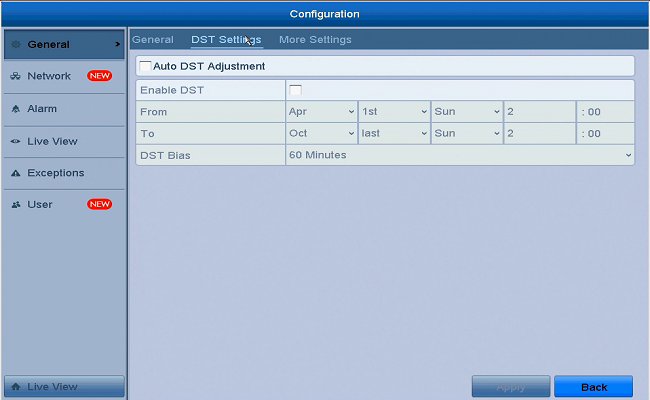
Please log in the system on your monitor and go to Menu -> Configuration -> general -> DST Setting.
Choose Auto DST Adjustment or you can manually set up the period, click “apply” to save the changes.
Was this article helpful?
Bu bilgiler sorununuzu çözmeye yardımcı oldu mu?
Still need help?
Uzman ekibimiz size yardımcı olmak için burada.