Annke Vision-How to Set up Privacy Mask? (H800)
Applies to: N48PAW/N46PCK/H800
Introduction:
If the camera is installed in a public place, some of the areas can not be monitored without permission due to the privacy law in some countries. In this article, we will show you how to set the privacy mask to avoid this kind of situation.
Steps:
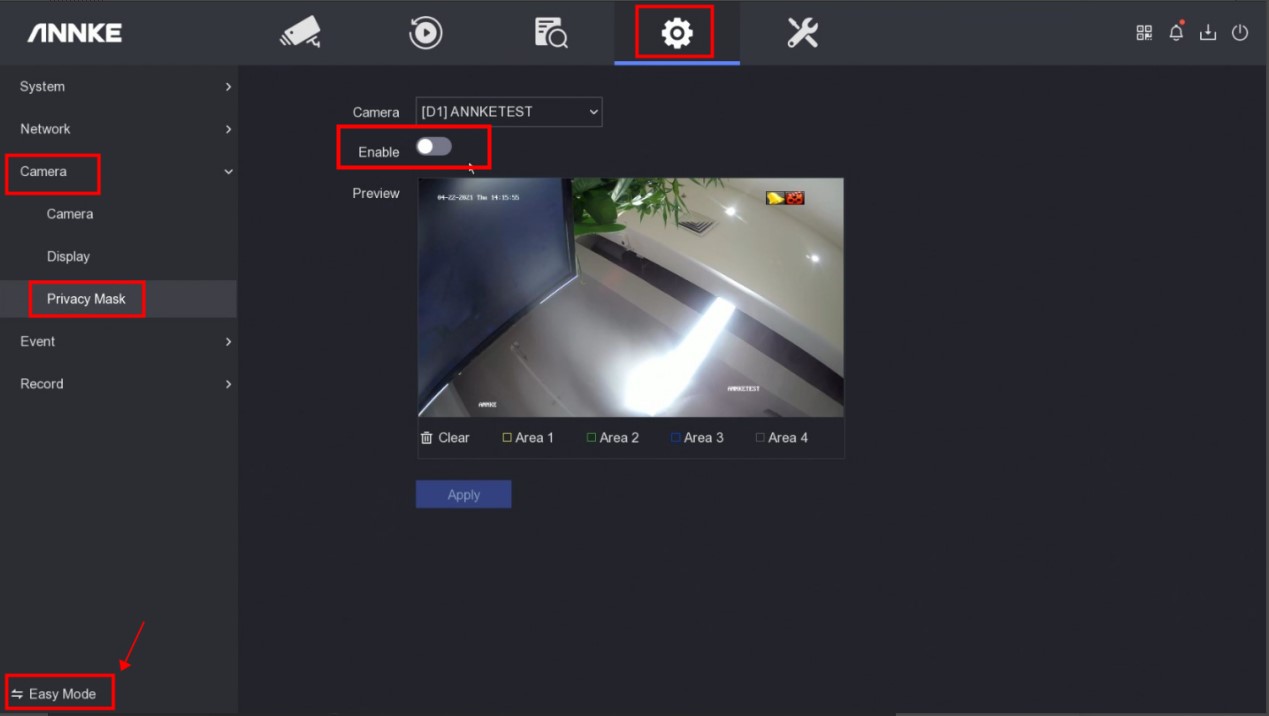
1. Access the system menu on the monitor and go to switch the system to 'Expert Mode' first on the left bottom corner.
2. Go to 'Camera→Privacy Mask' to enable the feature.
3. Draw the privacy area and click "Apply".
Notice:
If you have any other questions, please contact ANNKE technical support at support@annke.com by email.
If this article is helpful to you, please click the "helpful" button after you review it. Any comments would be appreciated.
Was this article helpful?
Bu bilgiler sorununuzu çözmeye yardımcı oldu mu?
Still need help?
Uzman ekibimiz size yardımcı olmak için burada.