Annke Vision - How to Update the System Firmware in the Web Interface?
Applies to: DT41Y/DT61Y/DT81Y/DN41R/DN61R/DN81R/DT41GB/DT81GB/DT61GB/DW41JD/DW81KD/DW61LD/DT81DP/N48PI/N44PI/N46PI/N48PBB/N44PAM/N48PAW/N46PCK/N88PCH/S500/S300/FC200/NCK800/H800/H500/FC800/E800
Steps:
1. Download the firmware file on a Windows computer.
2. Access the Web Interface of your ANNKE system. Please click on the link below to find detailed instructions.
Annke Vision - How to Access DVR/NVR System on Computer Browser with Its IP Locally?
3. Download and install the web plug-in. Then restart the browser.
3. Choose the firmware file and start the update.
Navigate to Configuration--System--Maintenance--Upgrade&Maintenance. Click Browse and choose the firmware file (in .DAV format, not .ZIP), then click Upgrade. (Fig. 1)
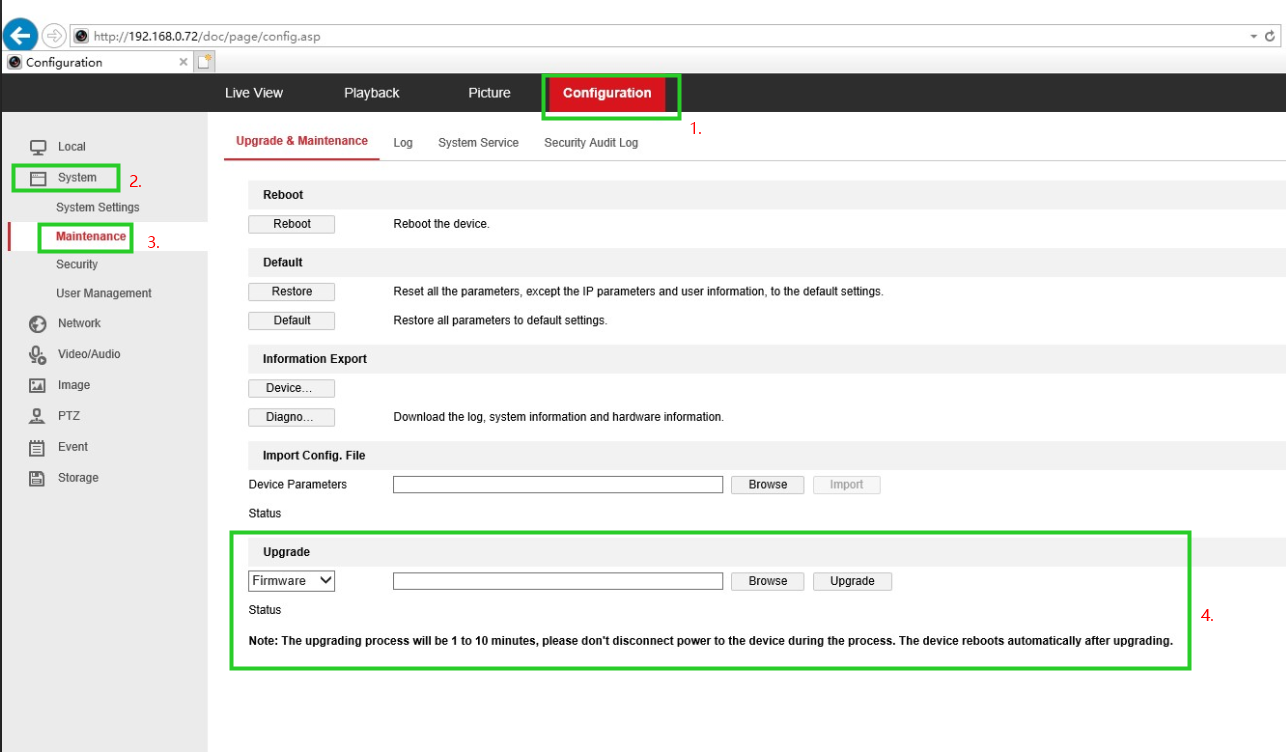
Fig. 1
The update will takes few minutes and reboot the camera automatically when finished.
Note: During the update, please don't unplug the camera from the power.
If this article is helpful to you, please click the "helpful" button after you review it. Any comments would be appreciated.
Was this article helpful?
Bu bilgiler sorununuzu çözmeye yardımcı oldu mu?
Still need help?
Uzman ekibimiz size yardımcı olmak için burada.