Annke Vision - How to Upgrade the IP Camera's Firmware?
Applies to: I91BM/I91BN/I91BL
Note:
This article is supposed to resolve the ‘Offline’ issue for the cameras models mentioned above.
For a firmware update on other camera models, please contact ANNKE support here.
Step 1:
Download the firmware file from the below link. Unzip it to get the file 'digicap.dav' on your computer.
https://download.annke.com/firmware/4K_POE/PJ14PC20210610011_IPC_G5_EN_NEU_5.5.102_210611.zip
Note:
Please unzip this '.zip' file to get the '.dav' file, which is the actual file used for firmware update.
Step 2:
Access the camera's Web interface on a computer browser.
- If the camera is used separately (without an ANNKE NVR), please refer to this link:
Annke Vision -- How to Access the Web interface of ANNKE PoE Cameras via Browser? (Without NVR) - If the camera is used with an ANNKE NVR, please refer to this link:
Annke Vision - How to Access the IP camera's configuration page on the NVR?
Step 3:
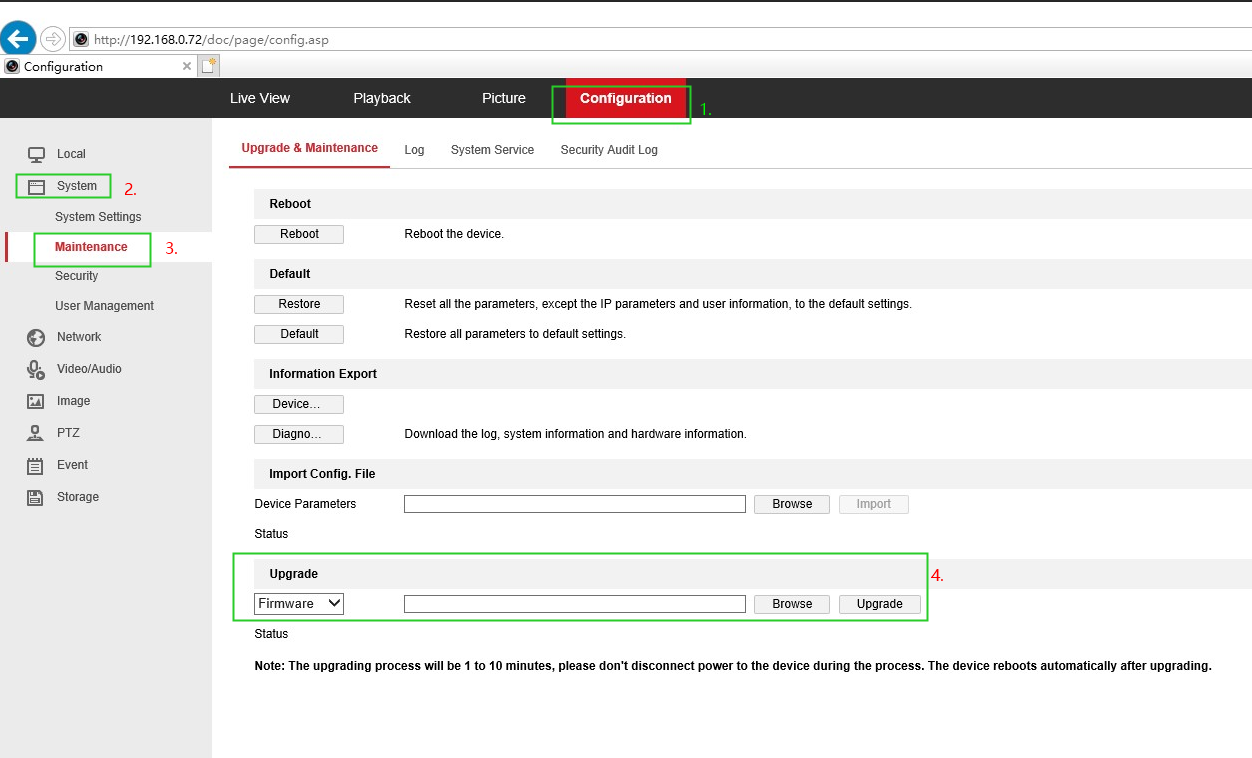
On the camera's Web interface on IE browser (Internet Explorer), navigate to Configuration--System--Maintenance--Upgrade and Maintenance. Click [Browse] to choose the firmware file 'digicap.dav', then click [Upgrade] to begin the firmware upgrade. When the upgrade finished, the camera will reboot automatically.
Note: Please do NOT close the page or move the camera during the upgrade.
Was this article helpful?
Bu bilgiler sorununuzu çözmeye yardımcı oldu mu?
Still need help?
Uzman ekibimiz size yardımcı olmak için burada.