Annke Vision - Importing/Exporting Configuration Files on Annke DVR/NVR
20 Aug 2026
392 views
Applies to: DT41Y/DT61Y/DT81Y/DN41R/DN61R/DN81R/DT41GB/DT81GB/DT61GB/DT41DB/DT81DB/DT61EQ/DW41JD/DW81KD/DW61LD/DT81DP/N48PI/N44PI/N46PI/N44PAM/N48PAW/N46PCK/N88PCH/N441Y/N481Y/S500/S300/FC200/NCK800/H800/H500
Purpose: The configuration files of the DVR/NVR can be exported to the local device for backup, and the configuration files of one DVR/NVR can be imported to multiple DVR/NVR devices if they are to be configured with the same parameters.
Before you start:
- You have installed the external devices like USBs into your DVR/NVR.
- You should log in to your DVR/NVR.
Steps:
-
Click Menu > Maintenance > Import/Export.
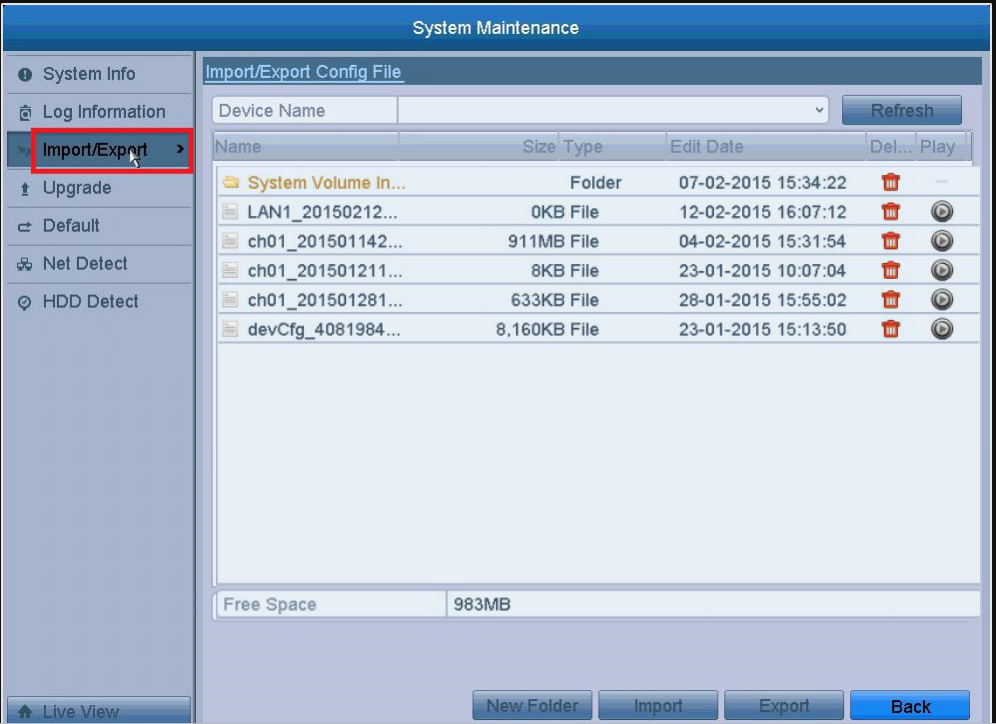
- Select the Files you want and select the Device Name, then click the Export button to export configuration files to the selected local backup device.
- To import a configuration file, select the file from the selected backup device and click the Import After the import process is completed, you must reboot the DVR/NVR.
Notes:
- New Folder: Click it to create a new folder
-
 : Delete the selected files;
  : Play the selected files.
- After having finished the import of configuration files, the device will reboot automatically.
Was this article helpful?
Bu bilgiler sorununuzu çözmeye yardımcı oldu mu?
Thanks for your feedback!
Still need help?
Uzman ekibimiz size yardımcı olmak için burada.