Annke Vision - Set up HDD Group on Annke DVR/NVR
Applies to: DT41Y/DT61Y/DT81Y/DN41R/DN61R/DN81R/DT41GB//DT81GB/DT61GB/DT41DB/DT81DB/DT61EQ/DW41JD/DW81KD/DW61LD/DT81DP/N48PI/N44PI/N46PI/N44PAM/N48PAW/N46PCK/N88PCH/N441Y/N481Y/S500/S300/FC200/NCK800/H800/H500
Purpose:
- You can group the HDDs and save the record files in certain HDD group.
- Multiple HDDs can be managed in groups. Video from specific channels can be recorded onto a particular HDD group through HDD settings.
Before you start:
- You should log in to your DVR/NVR account before setting up the HDD Group.
- Click Menu>HDD>Advanced
Interface: 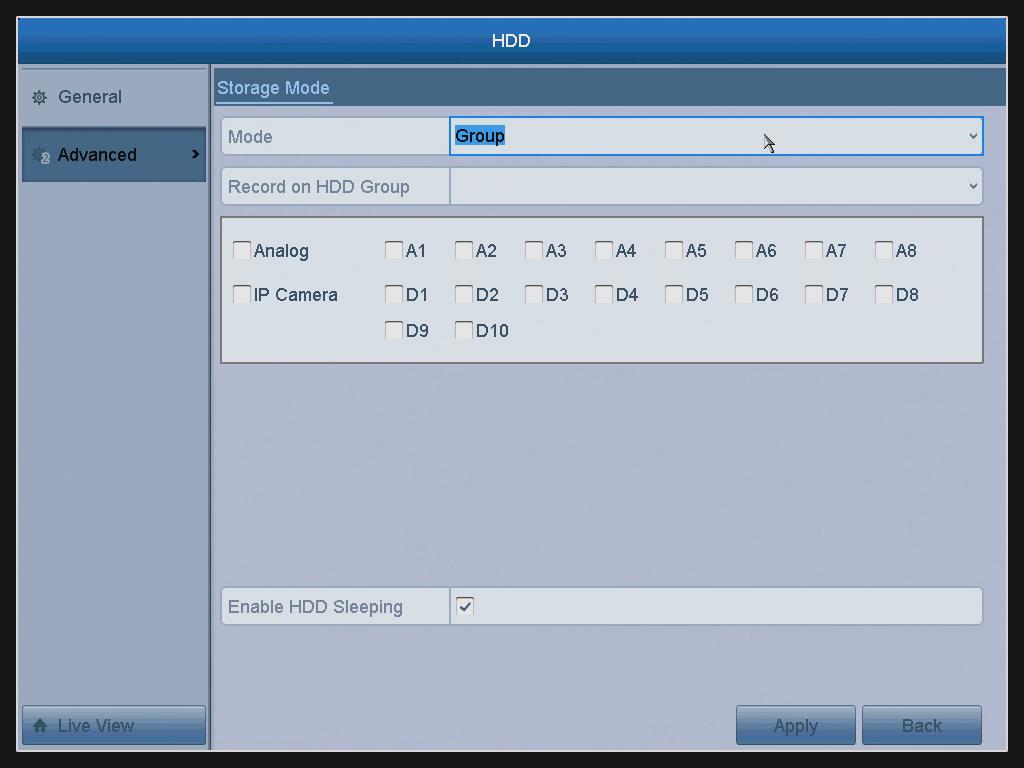
Mode: Select the Group.
Record on HDD Group: Choose the Group you want to record.
Analog: Choose the cameras you want, to set up a group.
IP camera: Choose the IP cameras you want, to set up a group.
Enable HDD Sleeping: Tick the checkbox to enable the function to protect HDDs use life.
Apply: Click the Apply button to apply the settings.
Back: Back to the previous page.
Note: After click the Apply button and the following Attention box will pop up, click Yes to reboot.

Was this article helpful?
Bu bilgiler sorununuzu çözmeye yardımcı oldu mu?
Still need help?
Uzman ekibimiz size yardımcı olmak için burada.