Annke Vision - Set up Motion Detection on Annke DVR/NVR
20 Aug 2026
424 views
Applies to:DT41Y/DT61Y/DT81Y/DN41R/DN61R/DN81R/DT41GB/DT81GB/DT61GB/DT41DB/DT81DB/DT61EQ/DW41JD/DW81KD/DW61LD/DT81DP/N48PI/N44PI/N46PI/N44PAM/N48PAW/N46PCK/N88PCH/N441Y/N481Y/NCK800/H800/H500
Purpose:
Enabling motion detection can trigger certain channels to start recording, or trigger full-screen monitoring, audio warning, notifying the surveillance center, sending an email and so on.
You can enable the function and set it up.
Before you start:
- You should log in to your DVR/NVR.
- Click Menu>Camera>Motion
Enter the Motion interface and Configure Motion Detection.
- Camera: Choose a camera you want to configure.
- Enable Motion Detection: Tick the checkbox to enable motion detection.
- False Alarm Filter: Tick it to enable RIP function.
- Sensitivity: Slide the progress bar to the right to adjust the sensitivity of motion detection.
-
Full Screen: Set the motion detection for all the area shots.
Note: You can drag and draw the area for motion detection by mouse. -
Clear: Clear the motion detection area.
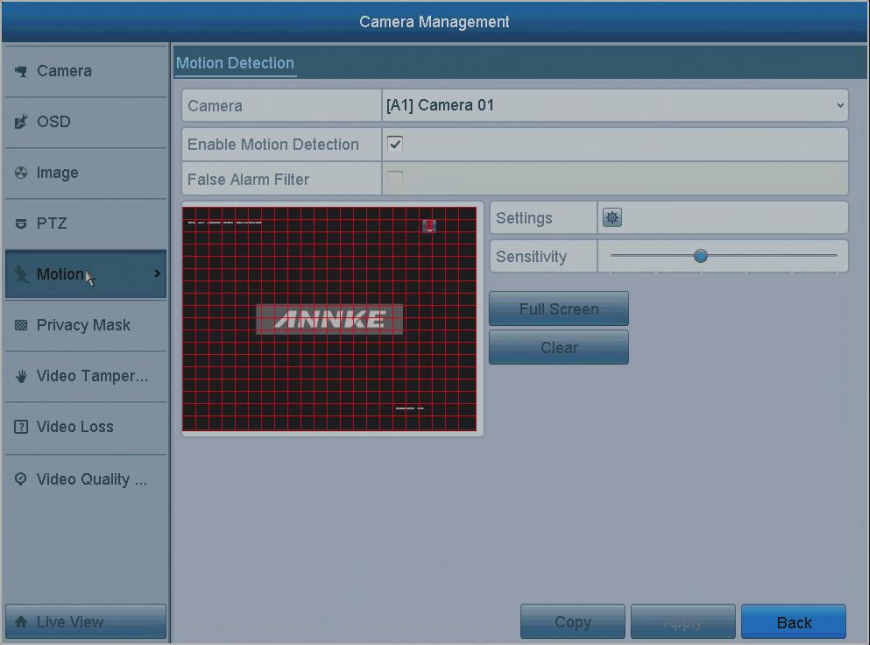
- Settings: Select the trigger channels, Set the arming schedule, and linkage action according to your needs.
- Trigger channels: select the channel you want to set up.
- Arming schedule: set up the arming schedule.
- Linkage action: enable or unable the linkage action.
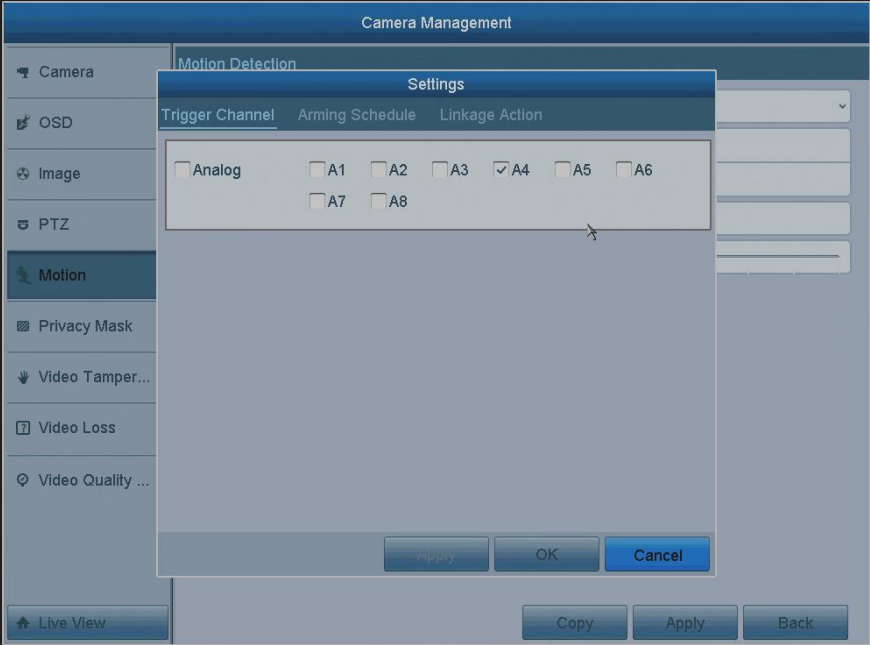
- Apply: Click Apply to save the setting.
- OK: Click OK to exit this page.
- Copy: Click it to copy to other channels you want.
Note: Please refer to Set up Recording Schedule on Annke DVR/NVR to configure recording schedule, while you may choose Motion as the record type.
Was this article helpful?
Bu bilgiler sorununuzu çözmeye yardımcı oldu mu?
Thanks for your feedback!
Still need help?
Uzman ekibimiz size yardımcı olmak için burada.