Annke Vision - Set up Network Platform Access and Enable P2P on Annke DVR/NVR
Applies to:
DT41Y/DT61Y/DT81Y/DN41R/DN61R/DN81R/DT41GB/DT81GB/DT61GB/DT41DB/DT81DB/DT61EQ/DW41JD/DW81KD/DW61LD/DT81DP/N48PI/N44PI/N46PI/N44PAM/N48PAW/N46PCK/N88PCH/N441Y/N481Y/S500/S300/FC200/NCK800/H800/H500/FC800/E800
Purpose: You can enable the Cloud P2P, and check the network status and find the verification code on this page
Before you start:
- You have logged into your device.
- Click Menu > Network > Platform Access
Interface: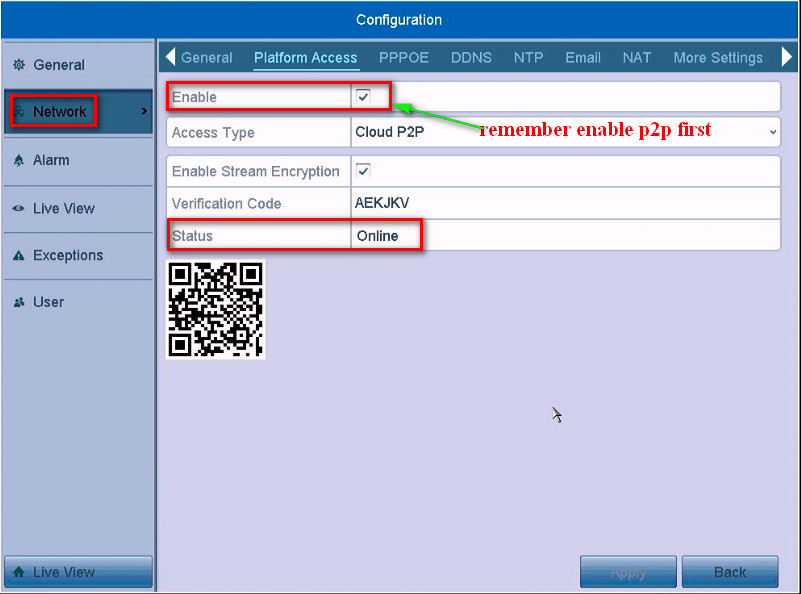
Enable: Tick the checkbox and enable the P2P, you are able to connect the network.
Access Type: Select Cloud P2P.
Enable Stream Encryption: Tick it to protect the information. (optional)
Verification Code: Get the verification code to add your device.
Status: If you successfully have connected the network, it will show online, Otherwise it shows offline.
Apply: Click Apply to save the settings.
Was this article helpful?
Bu bilgiler sorununuzu çözmeye yardımcı oldu mu?
Still need help?
Uzman ekibimiz size yardımcı olmak için burada.