Annke Vision - Set up Record Advanced Settings on Annke DVR
Applies to: DT41Y/DT61Y/DT81Y/DN41R/DN61R/DN81R/DT41GB/DT81GB/DT61GB/DT41DB/DT81DB/DT61EQ/DW41JD/DW81KD/DW61LD/DT81DP/S500/S300/FC200/FC800/E800
Purpose: You can choose a higher resolution of your cameras to have a more clear view, enable orH.264+/H.265+ to have a longer recording time, and choose automatically overwritten HDD to continue long recording.
Before you start:
- You should log in to your DVR.
- Click Menu > Record > Advanced.
The Advanced Setting Interface:
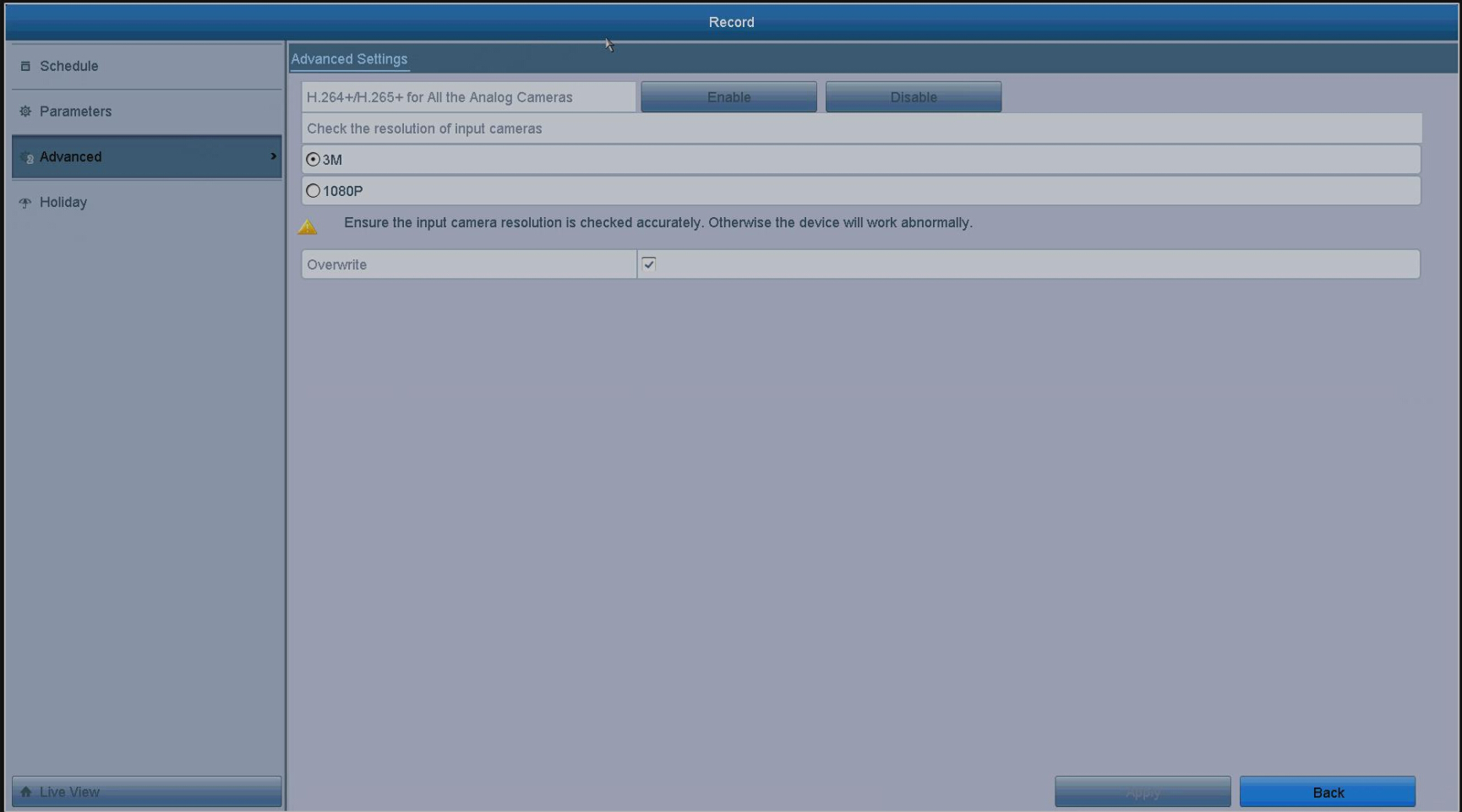
You can configure the following parameters.
H.264+/H.265+for All the Analog Cameras: Click Enable and the video files will be compressed smaller and recording time will be longer.
Check the resolution of input cameras:3M/1080p: Two types for you to choose the resolution of your cameras.
Overwrite: After choosing this function, the video files in HDD will be overwritten automatically.
Click Apply to save the settings.
Was this article helpful?
Bu bilgiler sorununuzu çözmeye yardımcı oldu mu?
Still need help?
Uzman ekibimiz size yardımcı olmak için burada.