Annke Vision - Settings Page on Annke Vision App
Applies to: DT41Y/DT61Y/DT81Y/DN41R/DN61R/DN81R/DT41GB/DT81GB/DT61GB/DT41DB/DT81DB/DT61EQ/DW41JD/DW81KD/DW61LD/DT81DP/N48PI/N44PI/N46PI/N44PAM/N48PAW/N46PCK/N88PCH/N441Y/N481Y/S500/S300/FC200/NCK800/H800/H500/E500/E800
Purpose: You can learn about the Settings page.
Before you start:
- Run the App and log in to your account.
- You have added the device.
- Enter into Annke Vision, and enter the settings page of live view or playback. (How to enter?)
The Settings page interface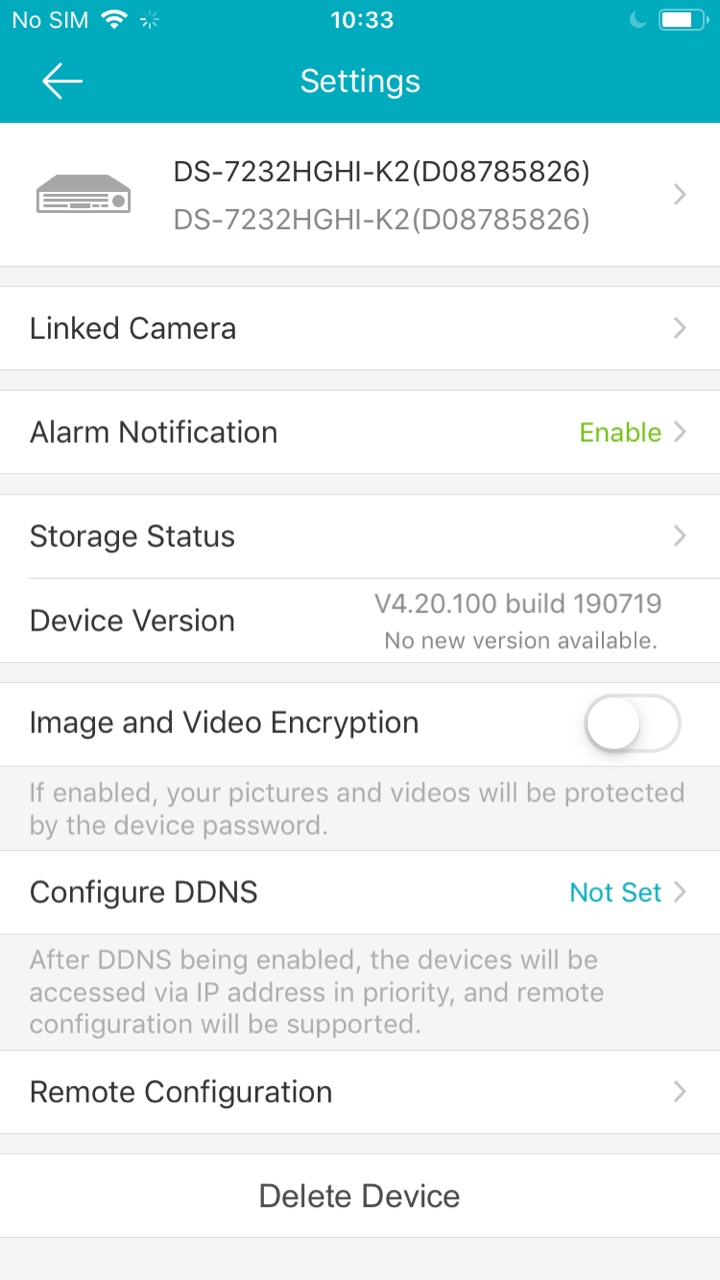
The Device Name: Tap it and edit the device name you like.
Linked Camera: Tap it and edit their names, as well as hide them so that they will not be displayed on the Annke Vision page.
Alarm Notification: Enable it and set up the motion schedule.
Storage Status: View the device storage status.
Device Version: View the current device version.
Image and Video Encryption: Enable or disable the video and image encryption function to encrypt the videos or the pictures.
Configure DDNS: View and configure DDNS.
Remote Configuration: View and configure remote settings.
Delete Device: Delete the devices you have added.
Was this article helpful?
Bu bilgiler sorununuzu çözmeye yardımcı oldu mu?
Still need help?
Uzman ekibimiz size yardımcı olmak için burada.