Annke Vision - Shutdown on Annke DVR/NVR
20 Aug 2026
381 views
Applies to: DT41Y/DT61Y/DT81Y/DN41R/DN61R/DN81R/DT41GB/DT81GB/DT61GB/DT41DB/DT81DB/DT61EQ/DW41JD/DW81KD/DW61LD/DT81DP/N48PI/N44PI/N46PI/N44PAM/N48PAW/N46PCK/N88PCH/N441Y/N481Y/S500/S300/FC200/NCK800/H800/H500/E500/E800
Steps:
- Click Menu > Shutdown
- Select the Shutdown button.
- Click the Yes button.
- Finally, Turn off the power switch or unplug the power supply.
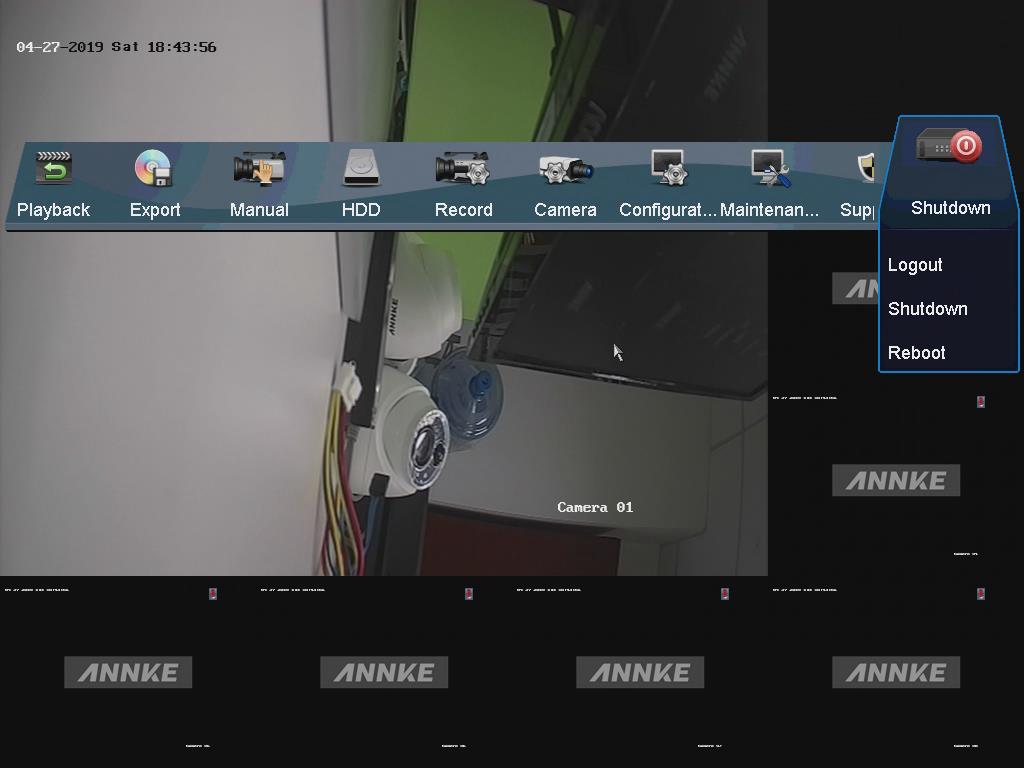
Note: When the shutdown note appears, remember to turn off the power switch or unplug the power supply to protect the device.
Was this article helpful?
Bu bilgiler sorununuzu çözmeye yardımcı oldu mu?
Thanks for your feedback!
Still need help?
Uzman ekibimiz size yardımcı olmak için burada.