Annke Vision - Why are some of camera channels in ANNKE Vision not found?
Applies to:
DT41Y/DT61Y/DT81Y/DN41R/DN61R/DN81R/DN31GN/DT41GB/DT81GB/DT61GB/DT41GB/DT81GB/DT41DB/DW41JD/DW81KD/DW61LD/DT81DP//N48PI/N44PI/N46PI/N44PAM/N48PAW/N46PCK/N88PCH/N48PBB
Purpose:
Sometimes you could view all cameras on the monitor, but only some of them on the APP. In this case, please refer to this instruction to check if the settings on the app are correct or not.
Steps:
1. Please run the Annke Vision app and find the device you want to check.
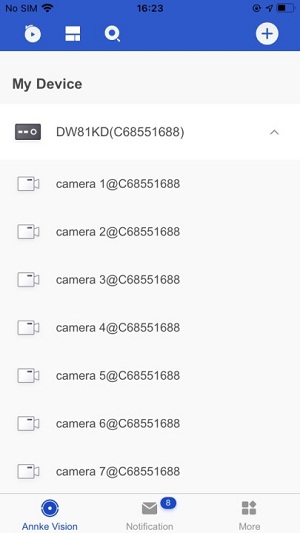
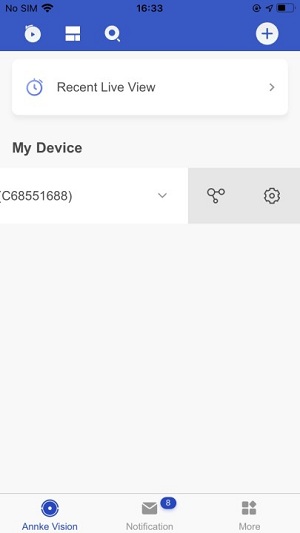
2. After selecting the device, swipe left and click the device setting button.
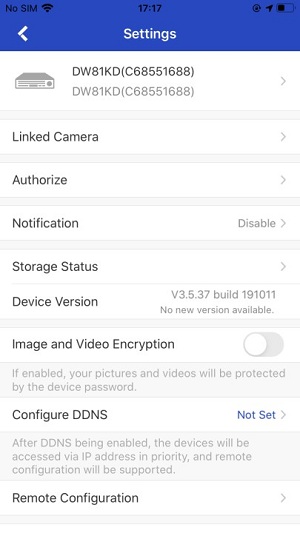
3. Click to select device information and click "Link Camera".
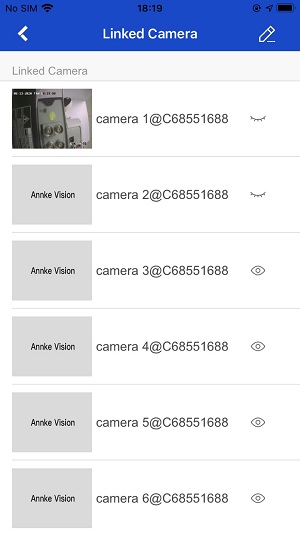
4. Check if the small eye icon behind the channel is open. If some of the eyes are closed, it means the corresponding channels are hidden. Click to open all the eyes and return to the device list, then you can view all the channels.
Was this article helpful?
Bu bilgiler sorununuzu çözmeye yardımcı oldu mu?
Still need help?
Uzman ekibimiz size yardımcı olmak için burada.