[AW-GET-094A-130]How to set VLAN and port trunk?
20 Aug 2026
293 views
QUESTION
I have two switches AW-GET-094A-130. How to setup two VLAN and port trunk for the two switches?
For switch 1
1. VLAN 11 for camera (port 1, 2, 3, 4)
2. VLAN 42 for management(Port 5, 6, 7)
3. Port 8 Trunk
For switch 2
1. VLAN 11 For camera (port 1,2,3,4)
2. VLAN 42 For management(port 5, 6, 7)
3. Port 8 Trunk
I want switch 1 VLAN 11 can talk with switch 2 VLAN 11 and switch 1 VLAN 42 management can talk with switch 2 VLAN 42 management, see Architcture.png.
For switch 1
1. VLAN 11 for camera (port 1, 2, 3, 4)
2. VLAN 42 for management(Port 5, 6, 7)
3. Port 8 Trunk
For switch 2
1. VLAN 11 For camera (port 1,2,3,4)
2. VLAN 42 For management(port 5, 6, 7)
3. Port 8 Trunk
I want switch 1 VLAN 11 can talk with switch 2 VLAN 11 and switch 1 VLAN 42 management can talk with switch 2 VLAN 42 management, see Architcture.png.
ANSWER
Please follow below steps to set VLAN and port trunk for each switch.
Step1: Connect your PC to any of port 1-4 of the switch to open switch web UI.
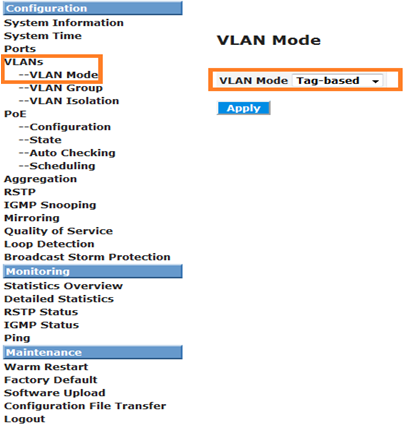
Step2: Set VLAN mode to "Tag-based".
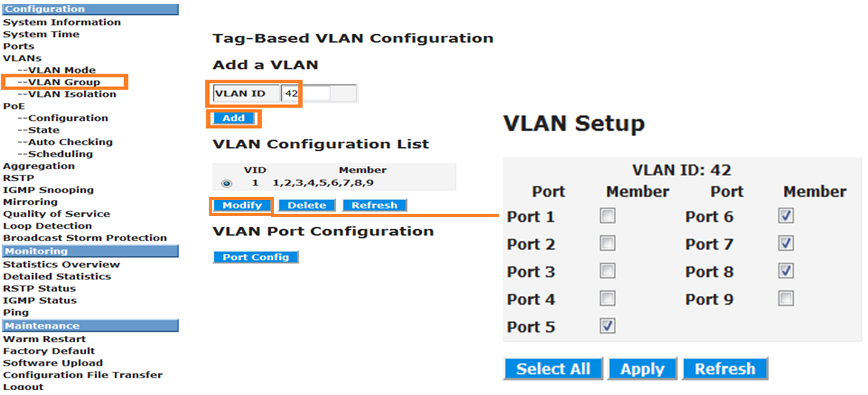
Step3: Create a VLAN group "42" and then click "modify" to enable port 5-8.
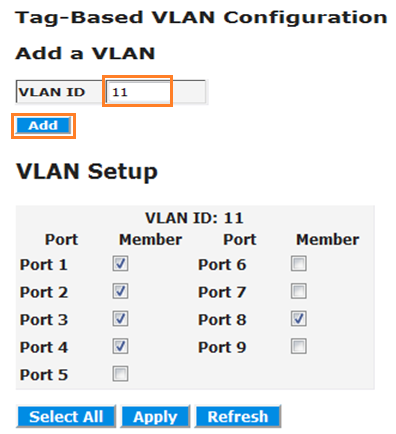
Step4: Create a VLAN group "11" and click "modify" to enable port 1-4 and port 8.
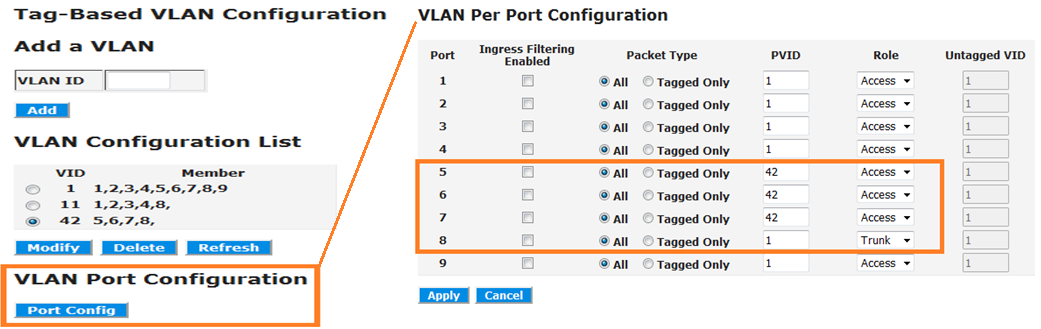
Step5: Click "port config" to set port 5-8 as below. Note that port 8 is for trunk.
Step6: Modify "Management VLAN" to "42".
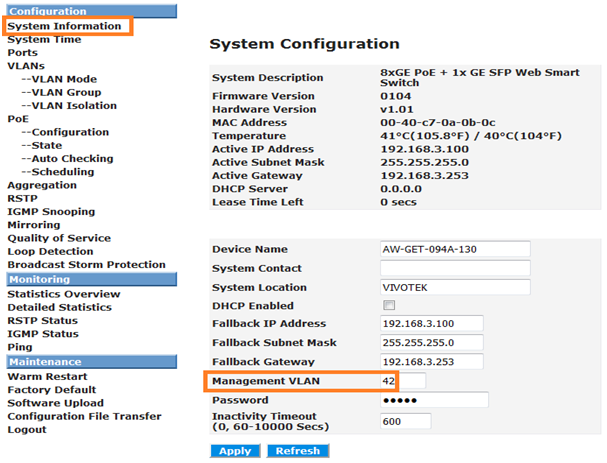
Step7: Connect your PC to any of port 5-7 of the switch to open switch web UI.
Step8: Click "port config" to set port 1-4 as below.
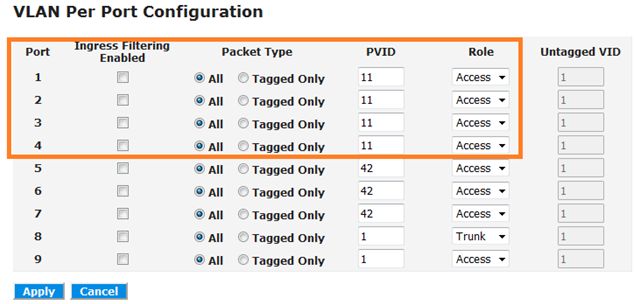
Step1: Connect your PC to any of port 1-4 of the switch to open switch web UI.
Step2: Set VLAN mode to "Tag-based".
Step3: Create a VLAN group "42" and then click "modify" to enable port 5-8.
Step4: Create a VLAN group "11" and click "modify" to enable port 1-4 and port 8.
Step5: Click "port config" to set port 5-8 as below. Note that port 8 is for trunk.
Step6: Modify "Management VLAN" to "42".
Step7: Connect your PC to any of port 5-7 of the switch to open switch web UI.
Step8: Click "port config" to set port 1-4 as below.
Was this article helpful?
Bu bilgiler sorununuzu çözmeye yardımcı oldu mu?
Thanks for your feedback!
Still need help?
Uzman ekibimiz size yardımcı olmak için burada.