Danale - How to Share the Device with Others?
20 Aug 2026
305 views
Applies to:
I41HD/I41EH
As the device is bound with the account, you need to share it with others if they want to watch the device.
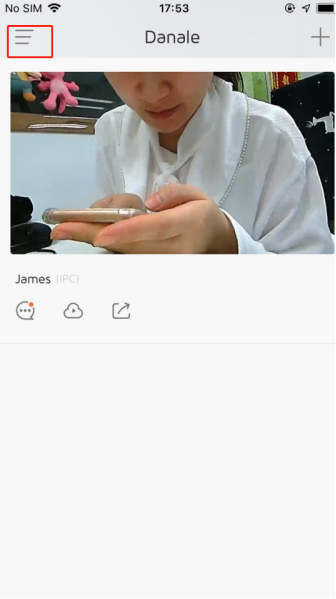
1. Click the setting icon in the upper left corner.

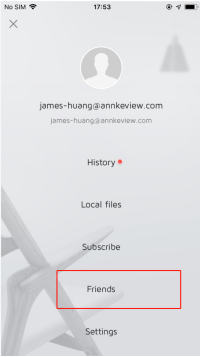
2. Click “Friends".

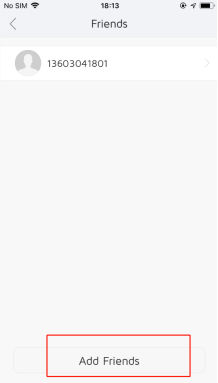
3. Click “Add Friends”
4. Grant the recipient access rights and click “Share”
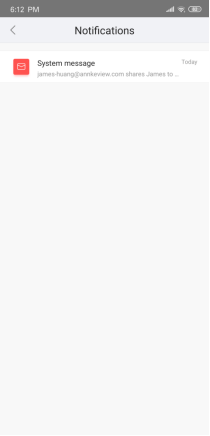
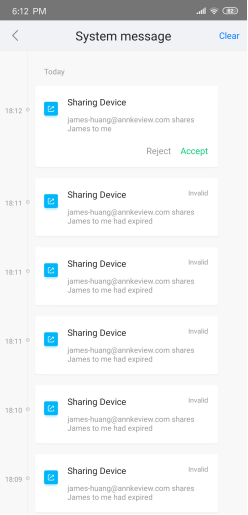
After the recipient accepts your sharing, he or she can start to watch the device.

Was this article helpful?
Bu bilgiler sorununuzu çözmeye yardımcı oldu mu?
Thanks for your feedback!
Still need help?
Uzman ekibimiz size yardımcı olmak için burada.