How to Add Installers to the SecureGuard Dashboard
20 Aug 2026
355 views
- Log into the SecureGuard Dashboard
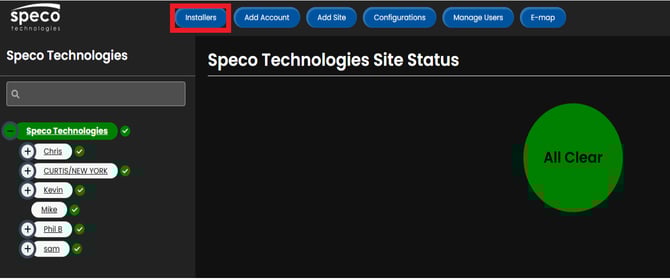
- At the top of the window, click the Installers tab
- Click Add Installer
- Current installers can also be deleted and edited from this page
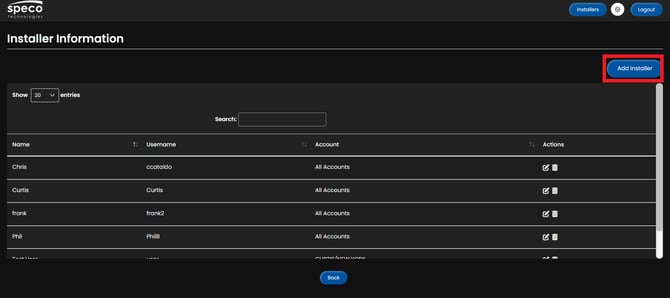
- Current installers can also be deleted and edited from this page
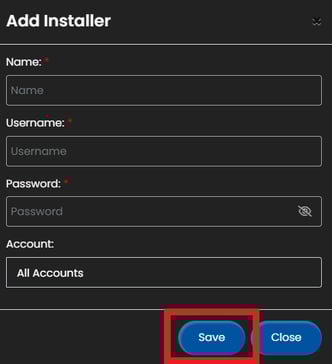
- Provide Installer account details details
- These are the credentials that will be used to log in to the SecureGuard Client App
- Click Save
Initial submission Date: July 14, 2025

Article authored by: Christopher Cataldo, Technical Support Lead
- Log into the SecureGuard Dashboard
- At the top of the window, click the Installers tab
- Click Add Installer
- Current installers can also be deleted and edited from this page
- Current installers can also be deleted and edited from this page
- Provide Installer account details details
- These are the credentials that will be used to log in to the SecureGuard Client App
- Click Save
Initial submission Date: July 14, 2025

Article authored by: Christopher Cataldo, Technical Support Lead
Was this article helpful?
Bu bilgiler sorununuzu çözmeye yardımcı oldu mu?
Thanks for your feedback!
Still need help?
Uzman ekibimiz size yardımcı olmak için burada.