How to set up sub-users on a Speco Blue Recorder
20 Aug 2026
413 views
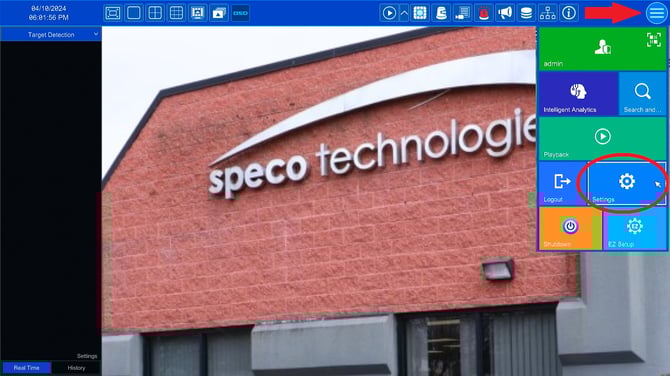
- Frist go to Start > Settings
- Next Click on Account and Authority
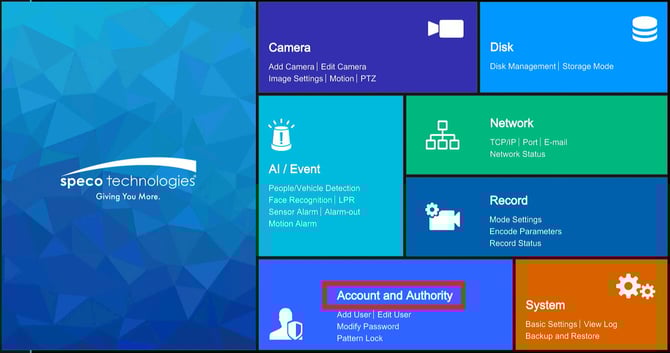
- Click on Add User
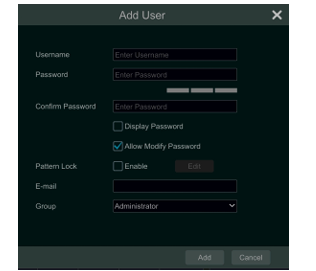
- Enter the desired username, password, and select the appropriate user group.
- If desired, set a pattern lock for added security.
- Providing an email address is optional.
- Once you have filled in the necessary information, click “Add” to create the new user account.
Initial submission Date: July 9, 2025

Article authored by: Samantha Franco, Tier 1

Article revised by: Christopher Cataldo, Technical Support Lead
- Frist go to Start > Settings
- Next Click on Account and Authority
- Click on Add User
- Enter the desired username, password, and select the appropriate user group.
- If desired, set a pattern lock for added security.
- Providing an email address is optional.
- Once you have filled in the necessary information, click “Add” to create the new user account.
Initial submission Date: July 9, 2025

Article authored by: Samantha Franco, Tier 1

Article revised by: Christopher Cataldo, Technical Support Lead
Was this article helpful?
Bu bilgiler sorununuzu çözmeye yardımcı oldu mu?
Thanks for your feedback!
Still need help?
Uzman ekibimiz size yardımcı olmak için burada.