How to Setup Time Synchronization on Speco Blue VMS Lite
20 Aug 2026
394 views
- First you will have to to go to the home tab on Speco blue VMS.
- If you are installing Blue VMS for the first time you are prompted to enable "Device Time Correction". Make sure this is unchecked.

- Next, click on the configuration setting and then click on server configuration, system settings and then device time configuration.

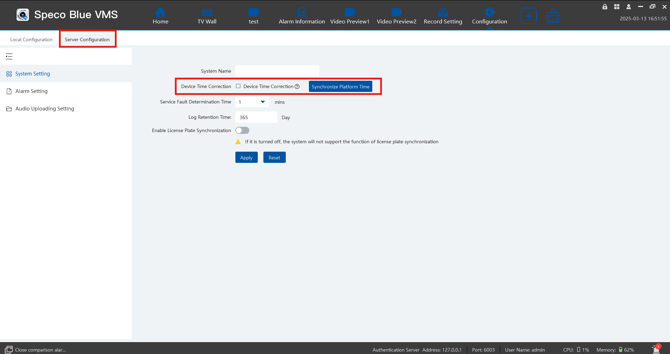
- You want to make sure that "Date and Time Correction" and "Synchronize Time Zone" are NOT checked.
NOTE: Keeping these settings off is crucial as these settings conflict with the time synchronization of the server.
Initial submission Date: March 13, 2025

Article authored by: Michael Pagano, Tier 1
- First you will have to to go to the home tab on Speco blue VMS.
- If you are installing Blue VMS for the first time you are prompted to enable "Device Time Correction". Make sure this is unchecked.
- Next, click on the configuration setting and then click on server configuration, system settings and then device time configuration.
- You want to make sure that "Date and Time Correction" and "Synchronize Time Zone" are NOT checked.
NOTE: Keeping these settings off is crucial as these settings conflict with the time synchronization of the server.
Initial submission Date: March 13, 2025

Article authored by: Michael Pagano, Tier 1
Was this article helpful?
Bu bilgiler sorununuzu çözmeye yardımcı oldu mu?
Thanks for your feedback!
Still need help?
Uzman ekibimiz size yardımcı olmak için burada.