How to Use Ping Command on Windows PC?
Applies to: Windows PC
Purpose: "Ping" (Packet Internet Groper) is a command which tests the connection between two network nodes by sending packets to a host and then reporting the time it takes to get a response. The nodes can be in a local area network, wide area network, or anywhere on the Internet, and you can ping an IP address or a domain name.
You may refer to the following steps to use the ping command on your Windows PC.
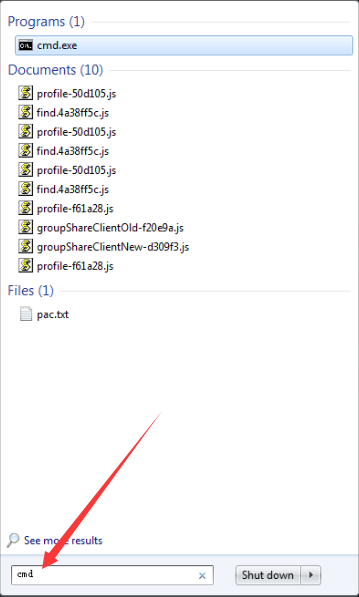
Step 1. On Windows, click on the Search icon, then type cmd in the search box and tap on Command Prompt.
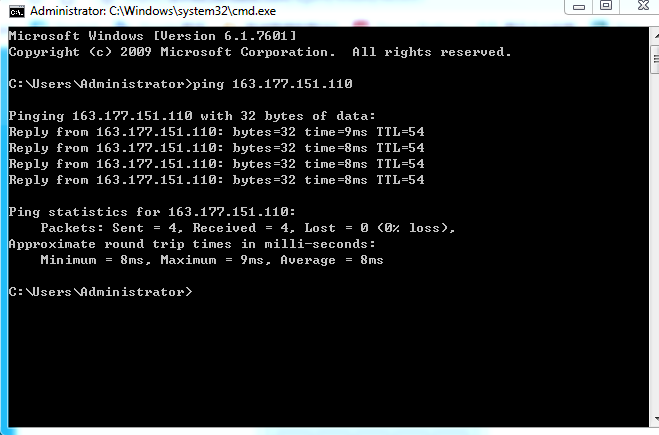
Step 2. Enter the word ping, followed by a space, then the domain name/IP address (then hit Enter to check your ping output).
- Ping an IP address
- Ping a domain name
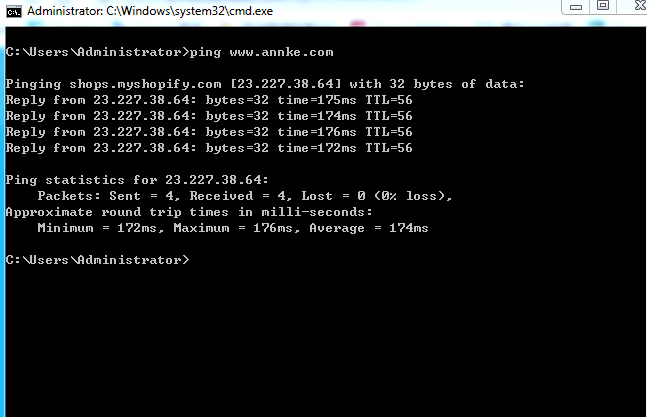
If it displays a series of replies, the network connection is working, and the time shows you how fast the connection is. If you see a "timed out" error instead of a reply, then there is a breakdown somewhere between your computer and the domain/IP.
Was this article helpful?
Bu bilgiler sorununuzu çözmeye yardımcı oldu mu?
Still need help?
Uzman ekibimiz size yardımcı olmak için burada.