[Linux-based NVRs] Why is the setting of stream 1 changed after adding camera to NVR?
20 Aug 2026
343 views
Question
After I set up my cameras and add them to an NVR, the settings of stream 1 are changed. Why does that happen?
Answer
As a video recording device, NVR offers some default settings for stream 1, which is for recording by default. This is convenient for the end-users to use cameras immediately after adding them to NVR without setting each by each.
The mechanism will change video codec, resolution, frame rate, and bit rate control. Resolution will be changed based on what a specific camera can support. Parameter: maximum bit rate of Bit rate control will then be set according to the resolution. Please refer to the Appendix 1.
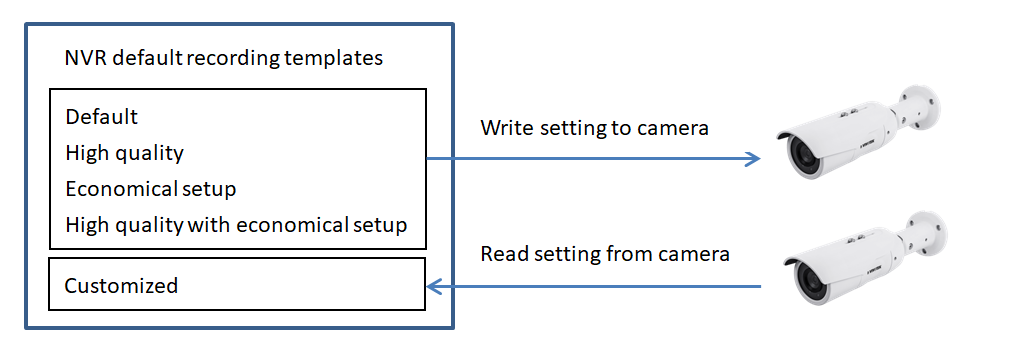
We provide 4 templates (Default mode, High quality mode, Economical setup mode, High quality and economical setup mode), for users to choose, along with 1 Customized mode, which simply reads the video settings from cameras, letting users set them individually, as the following illustration:
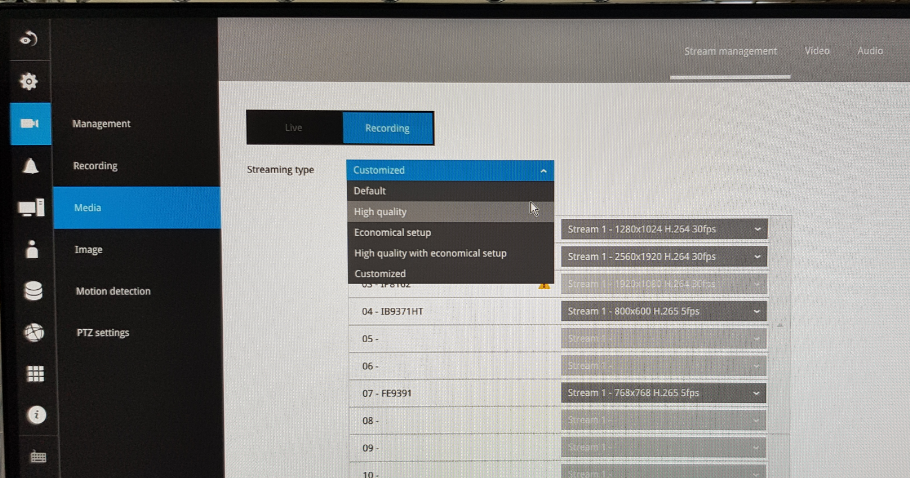
Note that this function can only be set from the local UI, as the below picture:
If the relative parameters are manually changed and saved later, they will remain the same after reboot or re-connection, instead of being restored to the above settings again.
Here I use IP9191-HP and ND9424P as an example to show how the 4 templates work. The relative parameters which IP9191-HP can support are listed in Appendix 2.
Appendix 1: policy of choosing maximum bit rate according to resolution
Appendix 2: relative parameters which IP9191-HP can support
The mechanism will change video codec, resolution, frame rate, and bit rate control. Resolution will be changed based on what a specific camera can support. Parameter: maximum bit rate of Bit rate control will then be set according to the resolution. Please refer to the Appendix 1.
We provide 4 templates (Default mode, High quality mode, Economical setup mode, High quality and economical setup mode), for users to choose, along with 1 Customized mode, which simply reads the video settings from cameras, letting users set them individually, as the following illustration:
Note that this function can only be set from the local UI, as the below picture:
If the relative parameters are manually changed and saved later, they will remain the same after reboot or re-connection, instead of being restored to the above settings again.
Here I use IP9191-HP and ND9424P as an example to show how the 4 templates work. The relative parameters which IP9191-HP can support are listed in Appendix 2.
| 1. Default mode | ||
| general case | IP9191-HP | |
| Video codec | If support H.265, change to H.265 | H.265 |
| Resolution | Change to the maximum resolution the camera can support with area no more than 1920x1080 | 1920x1080 |
| Frame rate | 30 | 30 |
| Bit rate control | 1. Change to VBR with cap. If not, change to CBR 2. Quality: good 3. Maximum bit rate: see Appendix 1 |
8M |
| 2. High quality mode | ||
| general case | IP9191-HP | |
| Video codec | If support H.265, change to H.265 | H.265 |
| Resolution | Change to the maximum resolution the camera can support with area no more than 8000x8000 | 3840x2160 |
| Frame rate | 30 | 30 |
| Bit rate control | 1. Change to VBR with cap. If not, change to CBR 2. Quality: good 3. Maximum bit rate: see Appendix 1 |
8M |
| 3. Economical setup mode | ||
| general case | IP9191-HP | |
| Video codec | If support H.265, change to H.265 | H.265 |
| Resolution | Change to the maximum resolution the camera can support with area no more than 1280x800 | 1280x720 |
| Frame rate | 5 | 5 |
| Bit rate control | 1. Change to VBR with cap. If not, change to CBR 2. Quality: good 3. Maximum bit rate: see Appendix 1 |
3M |
| 4. High quality and economical setup mode | ||
| general case | IP9191-HP | |
| Video codec | If support H.265, change to H.265 | H.265 |
| Resolution | Change to the maximum resolution the camera can support with area no more than 8000x8000 | 3840x2160 |
| Frame rate | 5 | 5 |
| Bit rate control | 1. Change to VBR with cap. If not, change to CBR 2. Quality: good 3. Maximum bit rate: see Appendix 1 |
8M |
Appendix 1: policy of choosing maximum bit rate according to resolution
| condition | Maximum bit rate |
| 1920x1080 < area | 8M |
| 1280x800 < area <= 1920x1080 | 6M |
| 720x576 < area <= 1280x800 | 3M |
| Area <= 720x576 | 1M |
Appendix 2: relative parameters which IP9191-HP can support
| resolution | fps | maximum bit rate |
Was this article helpful?
Bu bilgiler sorununuzu çözmeye yardımcı oldu mu?
Thanks for your feedback!
Still need help?
Uzman ekibimiz size yardımcı olmak için burada.