Mobile APP setting for NVR&DVR
All the APP connection must make sure your DVR&NVR system is already connected to the internet. Please select the correct cable to connect between the Ethernet port and router LAN port
We did not suggest you directly connect the DVR&NVR via WIFI. The data for the DVR system on the internet is very big. sometimes the WIFI connection can not support such big data to make it stuck in APP
Make sure your router is successfully connected to assign the DVR&NVR IP address. It is the key point for the internet connection
Here is the method to identify which type your DVR&NVR is. Kindly please read it first:
https://support.sannce.com/hc/en-us/articles/900000421023
Type 1:
Please go to the "Main Menu" -" System" - " Network", do the DHCP setting. Please check it. then input the DNS server base on your router.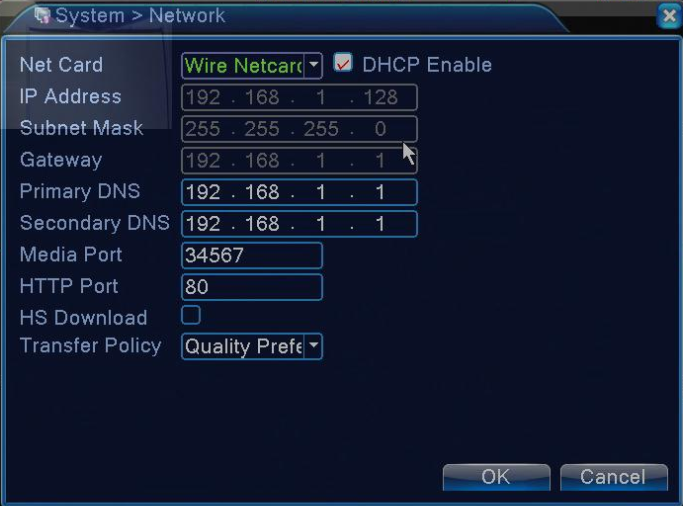
Then follow the guide to do the P2P status checking
https://support.sannce.com/hc/en-us/articles/900000431963
Once the status is connected, that means your device has successfully connected to the internet
For the phone view, please refer to the method in the link below.
https://support.sannce.com/hc/en-us/articles/900000448126
Type 2
Please go to the "System Setup" - " Network Setup", do the DHCP setting. Please enable checking the DHCP, Cloud, while finished, then checked the status, online or offline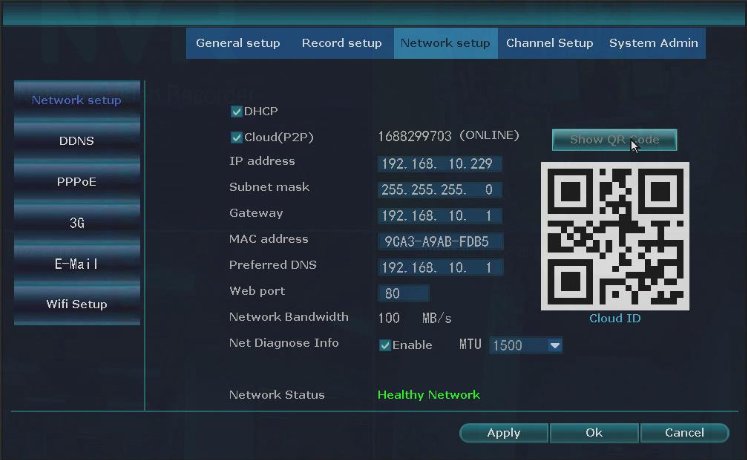
If all the step still not working, please refer to below link to do the static IP setting:
https://support.sannce.com/hc/en-us/articles/900000439703
Just make sure the internet connection is correct "online" status. Please follow the guide to do the App connection.
https://support.sannce.com/hc/en-us/articles/900000436303
Type 3:
Please go to the "Main menu" -" system" - " Network", do the DHCP setting. Please check it, then input the correct DNS server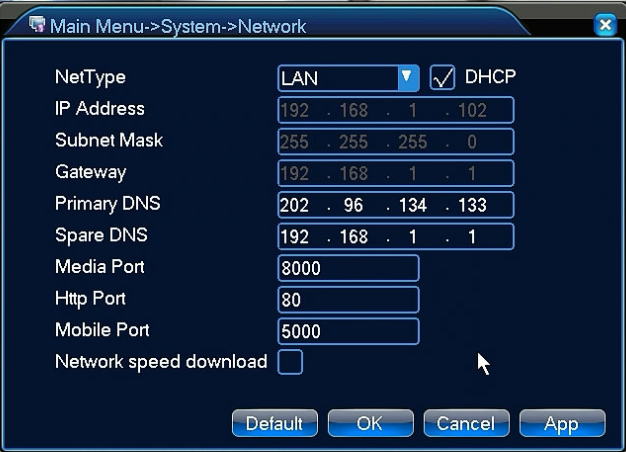
For phone view, please refer to the method in the link below.
https://support.sannce.com/hc/en-us/articles/900000437266
If all the step still not working, please refer to below link to do the static IP setting
Was this article helpful?
Bu bilgiler sorununuzu çözmeye yardımcı oldu mu?
Still need help?
Uzman ekibimiz size yardımcı olmak için burada.