NV-IPDM360A-3W Setup
20 Aug 2026
385 views
- Download the IP Pro app:
- Open the App and create a account
- Enter the app with your account
- Add the NV-IPDM360-3W camera via the + in the left top corner
- The app will ask you to scan a QR code
-
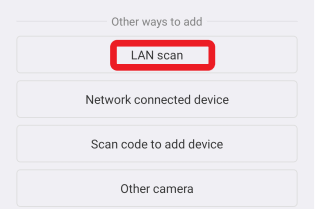
Other ways to add: in the window "Other ways to add" select: LAN scan (this will scan your network in search of all Nivian cameras)
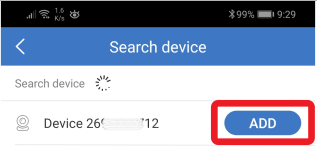
- Then ADD the camera
- Now the camera has been successfully added to the app
- About connecting the camera to your WiFi network, you can select the WiFi access point via the settings below the camera
Was this article helpful?
Bu bilgiler sorununuzu çözmeye yardımcı oldu mu?
Thanks for your feedback!
Still need help?
Uzman ekibimiz size yardımcı olmak için burada.