Sannce Cam - How to set up FTP function
Applies to:
I21AD/I21AP/I21BK/I21AG/I21AK/I21AN/I21AS/I21AR/I21AC/I21AL/I21AH/I21BC/I31BC/I41CB/I41CG/I41DC
This product only supports upload motion detection screenshots to FTP.
1. Please refer to this link below to enter to IP camera on the computer at first.
https://support.sannce.com/hc/en-us/articles/900000451866
2. Please refer to this link below to set up motion detection snapshot.
https://support.sannce.com/hc/en-us/articles/900000433903
3. Please go to Alarm Service Settings-Ftp Service Settings to fill out FTP Server, FTP user FTP password, port number.
When you tick Test, if it says test success, FTP set-up is working fine.

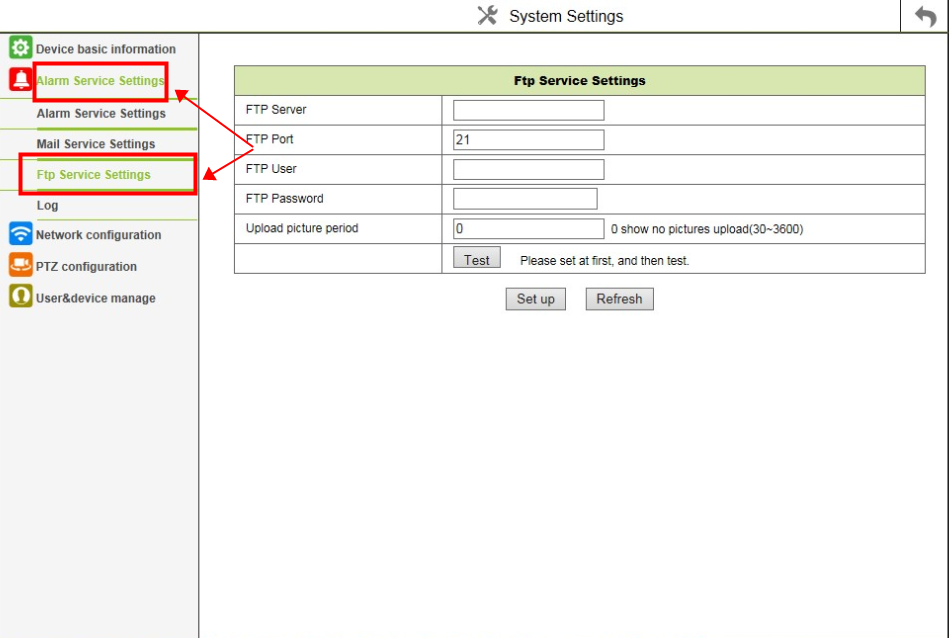
4. Finally, if there is movement detected by the camera, it will upload screenshots to the FTP server.
It may take the camera a few minutes to upload the video to FTP. Please wait with patience.
Was this article helpful?
Bu bilgiler sorununuzu çözmeye yardımcı oldu mu?
Still need help?
Uzman ekibimiz size yardımcı olmak için burada.