Sannce Home-How to create and find the verification code?
20 Aug 2026
344 views
Applies to: DN41CK/ DN81BL/ DT61BB/ DN81BG
Please go to Platform Access, click 'Enable' and create a "verification code" by yourself. Please note the verification code must be set up, otherwise, the network status of the NVR can't be online.
When the Status is 'Online', this system can be accessed remotely via the APP.
Tips:
1. If you don't want to enter the verification code each time when remote view the camera, please uncheck stream encryption.
2. The special characters are not allowed when setting up the verification code.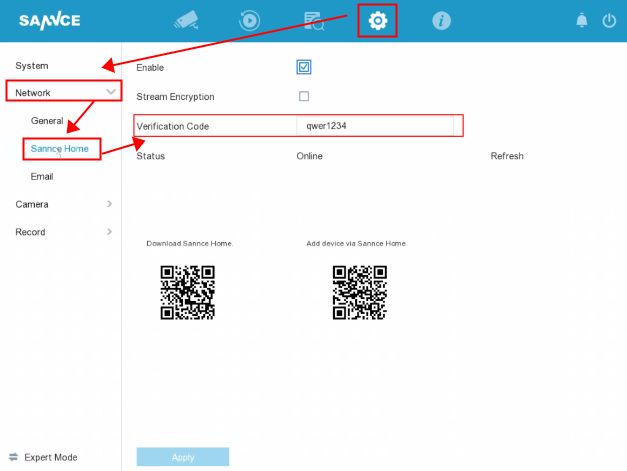
Was this article helpful?
Bu bilgiler sorununuzu çözmeye yardımcı oldu mu?
Thanks for your feedback!
Still need help?
Uzman ekibimiz size yardımcı olmak için burada.