Sannce Home - How to Setup Gmail Alarm for Motion Alarm?
Applies to: DN41CK/ DN81BL/ DT61BB/ DN81BG
Gmail setting
1.Please open the google and log in your google account.
Then click settings>your google's account icon>manage your google account:
2.Click security and login>two-step verification>enable two-step verification:

3.Please search 'app password' first.
If you didn't set it up before, please click the 'create and manage application-specific password' on 'help':
(Sorry, this 'help' part only displays in Chinese and but can't be set up in English.)
4.Name the device name and you will gain the 16-digit app password:

Internet status confirm
Check P2P status and make sure it is online. If it is not online, here is a solution.
https://support.sannce.com/hc/en-us/articles/900000545803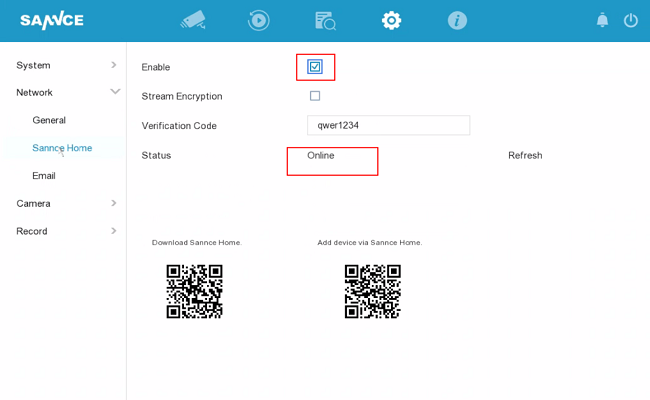
Gmail parameter setting in DVR
Go to Setting-->Network-->Email and set up email alert like the picture below.
The SMTP server is smtp.gmail.com
The user name is your Gmail account
SMTP port is 587 or 465
password is your Gmail password
Tick SSL
the sender can be anything
sender‘s address is your Gmail account
the receiver can be anything
receiver‘s address can be any email address
tick option enable attached file
click test. If the test succeeds, all is working.
Motion setting Linkage
Please go to Setting-->Camera-->Smart Event. Enable the alarm, then go to cover the available area.
Go to the Arming Schedule to select the available time for the alarm notification.
Go to Linkage Action to check the Send Email linkage.
After that, you could receive the alarm notifications for motion detection on your receiver's email.
Was this article helpful?
Bu bilgiler sorununuzu çözmeye yardımcı oldu mu?
Still need help?
Uzman ekibimiz size yardımcı olmak için burada.