Sub door station configuration via SCC Master board for any Safire 2nd Generation Video Door Station
20 Aug 2026
310 views
Note:
This tutorial is made with the SF-VIMOD-CAM-IP firmware version V2.2.45 build 210519
And SF-VI112-IPW-2MF as a Sub door station
Enter the master configuration page:
- Open SCC (Safire Control Center)
- Click on the master configuration icon
- Open the Device Management tab

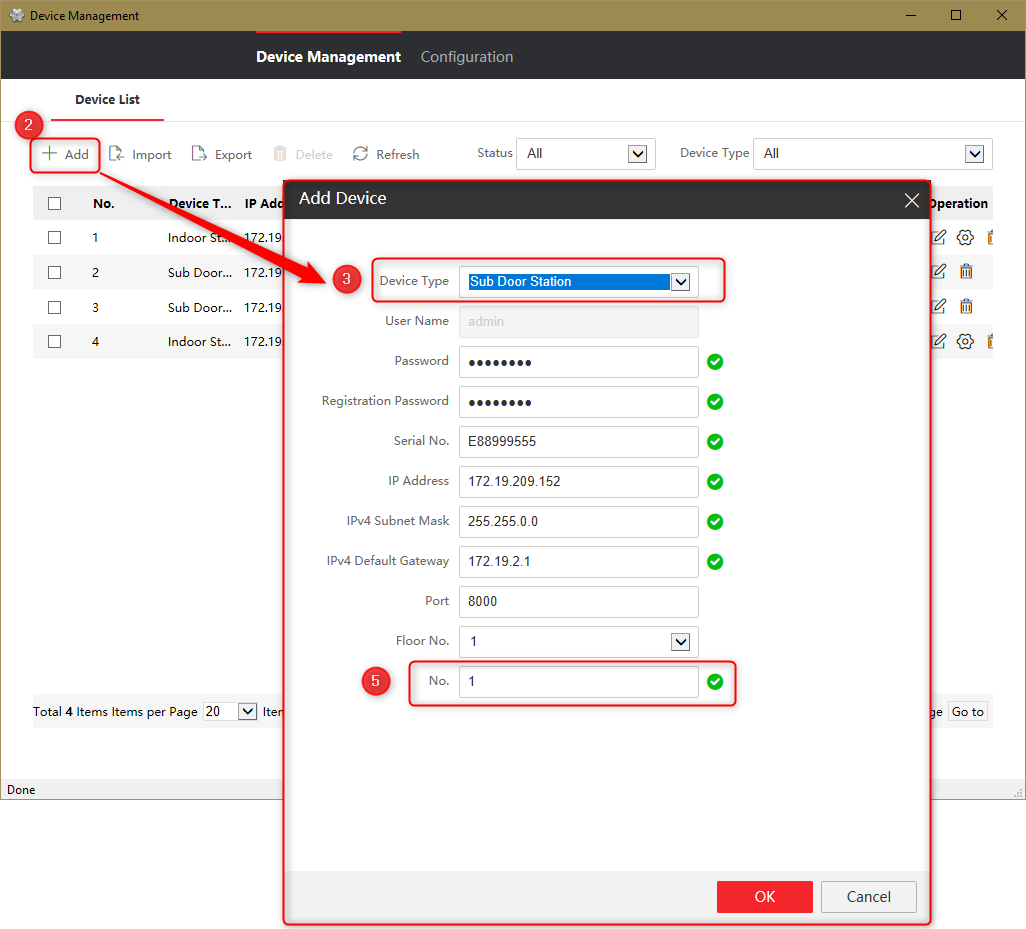
Add the slave outdoor station:
- Make sure that the new board is "Inactive"
- Click "Add".(Add)
- Select the device type:"Sub Door Station"
- Fill in the rest (the registration password can be different from the device)
- This will be the number of the slave, the first slave starts with 1 and the next with number 2
- Ok to save
- At first it seems to be offline

- The SCC will program the device automatically and the device will reboot and come online when you refresh the configuration page

Was this article helpful?
Bu bilgiler sorununuzu çözmeye yardımcı oldu mu?
Thanks for your feedback!
Still need help?
Uzman ekibimiz size yardımcı olmak için burada.